TL;DR: Writing a persuasive product description on Amazon requires strategic use of HTML formatting, SEO optimization, and proven copywriting techniques to boost visibility and conversions. This step-by-step guide shows you how to craft compelling, search-friendly descriptions that convert browsers into buyers.
Key Takeaways
- Use HTML tags like <b>, <br>, and <li> to improve readability and visual hierarchy in Amazon product descriptions.
- Structure your description with benefit-driven language, emotional triggers, and clear calls to action to increase conversion rates.
- Optimize for Amazon SEO by naturally integrating high-volume keywords without keyword stuffing.
- Follow Amazon’s formatting rules: avoid prohibited tags like <script> or <iframe> to prevent listing suppression.
- Leverage tools like SellerSprite to research keywords and analyze top-performing listings for competitive insights.
Table of Contents
- Why Persuasive Product Descriptions Matter on Amazon
- Step 1: Understand Amazon’s Product Description Rules and HTML Support
- Step 2: Research High-Converting Keywords and Competitor Listings
- Step 3: Structure Your Description with Persuasive Copywriting Techniques
- Step 4: Apply HTML Formatting for Maximum Readability
- Step 5: Optimize for Both SEO and Customer Engagement
- Step 6: Test, Refine, and Scale Winning Descriptions
- FAQ
- References
Note on marketplaces: This guide is specifically optimized for the US market.
Why Persuasive Product Descriptions Matter on Amazon
On Amazon, your product description is more than just a technical detail—it’s a silent salesperson working 24/7 to convince shoppers to click "Add to Cart." With over 350 million products listed on Amazon.com, standing out requires more than great images or competitive pricing. You need compelling, well-formatted, and strategically written content that speaks directly to customer pain points, builds trust, and drives action.
A persuasive product description doesn’t just inform—it converts. According to Amazon SEO best practices, listings with optimized, benefit-focused descriptions see up to 30% higher conversion rates compared to generic ones. This is especially true in competitive niches like skincare, fitness gear, or smart home devices, where small improvements in copy can lead to significant revenue gains.
But here’s the catch: Amazon has strict rules about what you can and can’t do in the product description field. Unlike your website, you can’t use full HTML or CSS. However, Amazon does support a limited set of HTML tags—when used correctly, these can dramatically improve readability, engagement, and even search ranking.
In this comprehensive guide, we’ll walk you through how to write a persuasive product description using HTML formatting, proven copywriting techniques, and Amazon-specific SEO strategies. Whether you're a new seller just getting started or a brand manager scaling across categories, this step-by-step tutorial will help you create listings that rank, convert, and scale.
Step 1: Understand Amazon’s Product Description Rules and HTML Support
Before you start writing, it’s crucial to understand Amazon’s guidelines for the product description field. Many sellers unknowingly violate these rules, leading to suppressed listings or poor performance.
Amazon allows the use of certain HTML tags in the Product Description field (not the bullet points or title), but only a limited subset. These tags help structure your content for better readability on both desktop and mobile devices.
Allowed HTML Tags on Amazon:
<b>– Bold text (e.g., <b>Waterproof Design</b>)<i>– Italic text<u>– Underlined text (use sparingly)<br>– Line break (essential for spacing)<ul>– Unordered list<ol>– Ordered list<li>– List item<span>– With limited styling (not always reliable)<div>– For layout (limited support)
Prohibited Tags (Will Get Your Listing Suppressed):
<script>,<iframe>,<form>– Security risks<meta>,<style>– Not allowed- External links or URLs – Amazon removes them automatically
💡 Pro Tip: Always preview your listing in Seller Central or use a tool like SellerSprite to simulate how your HTML will render on mobile and desktop.
Also, remember that Amazon’s algorithm indexes text from the product description for search relevance. So while this field doesn’t directly impact ranking as much as the title or bullet points, it still contributes to overall keyword coverage and customer trust.
Step 2: Research High-Converting Keywords and Competitor Listings
You can’t write a persuasive description without knowing what your customers are searching for. This is where Amazon product description SEO comes into play.
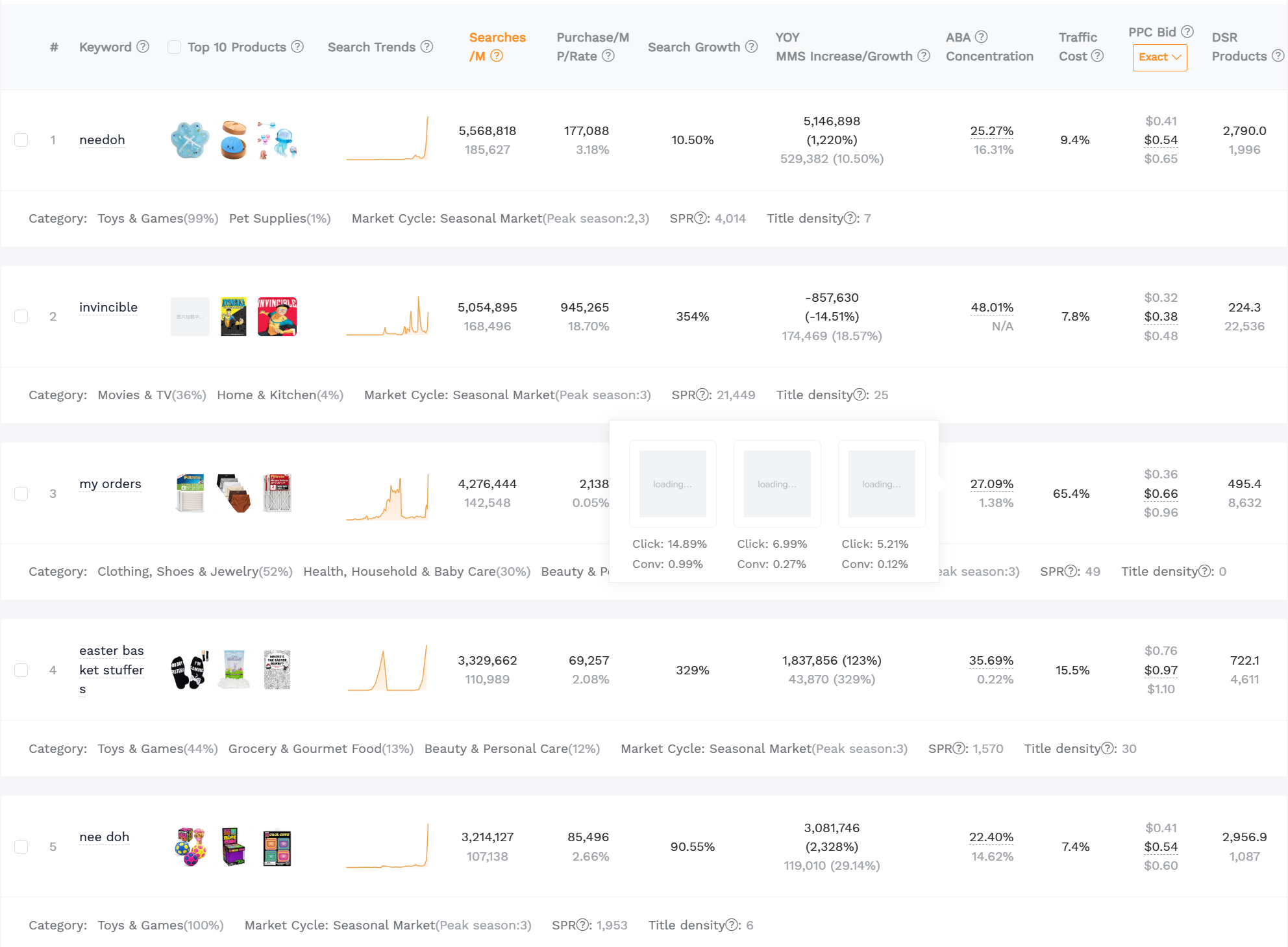
Start by identifying high-volume, low-competition keywords relevant to your product. Use tools like SellerSprite’s Keyword Research Tool to extract real search data from Amazon’s autocomplete, customer queries, and top-ranking listings.
For example, if you’re selling a reusable silicone food storage bag, potential keywords might include:
- eco-friendly food storage
- non-toxic sandwich bags
- leak-proof reusable bags
- dishwasher-safe silicone bags
- BPA-free food containers
Next, analyze the top 5 competitors in your niche. Study their product descriptions:
- What tone do they use? (Professional, friendly, urgent?)
- Do they use bullet-style formatting with <br> or <li>?
- Are they highlighting certifications (e.g., FDA-approved, FDA-compliant)?
- Do they include emotional triggers like “safe for kids” or “peace of mind”?
One real-world example: A top-selling silicone bag brand uses the phrase “Safe for Your Family, Planet, and Wallet” right at the top of their description. This combines emotional appeal (family safety), environmental concern (planet), and value (wallet)—a triple threat in persuasive copywriting.
Use these insights to build a keyword-rich, emotionally compelling framework for your own description.
Step 3: Structure Your Description with Persuasive Copywriting Techniques
Now that you have your keywords and competitive insights, it’s time to write. But don’t just list features—sell benefits.
The best product descriptions follow a proven structure:
1. Hook: Start with a Strong Opening
Grab attention in the first 10 words. Use a bold statement, a question, or a pain point.
Example: <b>Tired of plastic bags that split, leak, and harm the planet?</b><br>It’s time to upgrade to truly durable, eco-conscious storage.
2. Benefits Over Features
Customers don’t buy features—they buy outcomes. Turn specs into value.
Feature: Made from food-grade silicone
Benefit: <b>Safe for kids and meals:</b> Our BPA-free, non-toxic material won’t leach chemicals into food, even when frozen or microwaved.
3. Social Proof & Trust Builders
Include certifications, awards, or customer stats (if allowed).
<b>Trusted by 50,000+ eco-conscious families</b><br>Rated 4.8 stars from over 2,300 verified buyers.
4. Emotional Triggers
Tap into desires like safety, convenience, pride, or sustainability.
<i>Imagine opening your fridge and seeing a kitchen free of clutter and waste.</i><br>With our space-saving, reusable design, you’re not just storing food—you’re simplifying life.
5. Call to Action (CTA)
End with a gentle nudge to buy.
<b>Join the zero-waste movement today—click "Add to Cart" now!</b>
This structure ensures your description is not only informative but also emotionally engaging and conversion-focused.
Step 4: Apply HTML Formatting for Maximum Readability
Now let’s bring it all together with proper HTML formatting. On Amazon, readability is king—especially on mobile, where over 60% of shoppers browse.
Here’s a real example of a well-formatted product description using HTML:
<b>Tired of plastic bags that split, leak, and harm the planet?</b><br>
It’s time to upgrade to truly durable, eco-conscious storage.

<br>

<b>Safe for kids and meals:</b> Our BPA-free, non-toxic material won’t leach chemicals into food, even when frozen or microwaved.

<br>

<b>Why choose our silicone bags?</b>
<ul>
  <li>✅ Leak-proof seal for liquids and solids</li>
  <li>✅ Dishwasher, microwave, and freezer safe</li>
  <li>✅ Saves you $200+ per year on disposable bags</li>
  <li>✅ FDA-compliant and eco-certified</li>
</ul>

<i>Imagine opening your fridge and seeing a kitchen free of clutter and waste.</i><br>
With our space-saving, reusable design, you’re not just storing food—you’re simplifying life.

<br>

<b>Trusted by 50,000+ eco-conscious families</b><br>
Rated 4.8 stars from over 2,300 verified buyers.

<br>

<b>Join the zero-waste movement today—click \"Add to Cart\" now!</b>
💡 Formatting Tips:
- Use
<br>to separate paragraphs (Amazon ignores regular line breaks) - Use
<b>to highlight key benefits and CTAs - Use
<ul><li>for scannable feature lists - Avoid underlining (
<u>) unless for legal disclaimers - Keep sentences short and punchy for mobile readability
Step 5: Optimize for Both SEO and Customer Engagement
The best product descriptions do double duty: they rank well in search and convert visitors into buyers.
To achieve this balance:
1. Integrate Keywords Naturally
Don’t stuff keywords. Instead, weave them into benefit statements.
Instead of: “Silicone food storage bag, reusable bag, eco-friendly bag, non-toxic bag…”
Use: “Our eco-friendly silicone food storage bags are reusable, non-toxic, and perfect for meal prep.”
2. Use Synonyms and Related Terms
Amazon’s algorithm understands semantic relevance. Include variations like:
- “Meal prep containers” vs. “food storage bags.”
- “Eco-conscious” vs. “sustainable” vs. “planet-friendly.”
3. Prioritize Dwell Time
Engaging content keeps shoppers on your page longer, which signals quality to Amazon’s algorithm. Use storytelling, questions, and relatable scenarios to increase dwell time.
4. Avoid Keyword Cannibalization
Don’t repeat the same keywords from your title and bullets. Use the description to expand on secondary and long-tail terms.
For deeper insights, check out our guide on how to write Amazon bullet points and product descriptions for a full breakdown of content synergy across listing elements.
Step 6: Test, Refine, and Scale Winning Descriptions
Even the best-written description can be improved. Use A/B testing (via Amazon’s Manage Your Experiments or third-party tools) to compare different versions.
Test variables like:
- Emotional vs. factual tone
- Bold vs. italic emphasis
- Different CTAs (“Buy now” vs. “Join the movement”)
- List format (bullets vs. paragraphs)
Track metrics like conversion rate, session duration, and exit rate to determine what works best.
Once you find a winning formula, document it and apply it across your catalog. Consistency builds brand trust and makes scaling easier.
For brands managing multiple SKUs, consider creating a description template with placeholders for product-specific details. This ensures quality control while saving time.
FAQ
How can I use HTML to make my Amazon product description more persuasive?
You can use basic HTML tags like <b> for bold text, <br> for line breaks, and <ul><li> for bullet lists to improve readability and emphasize key benefits. For example, using <b>Safe for Kids</b> draws attention to a major selling point. Proper formatting makes your description scannable, especially on mobile, which increases engagement and conversion potential.
What are the best practices for writing a product description that converts on Amazon?
Best practices include starting with a strong hook, focusing on benefits over features, using emotional triggers, including social proof, and ending with a clear call to action. Use concise, scannable formatting with HTML line breaks and bold text. Avoid jargon and write in a voice that resonates with your target audience—whether that’s eco-conscious parents, fitness enthusiasts, or tech-savvy professionals.
How do I optimize my Amazon product description for both SEO and customer engagement?
To optimize for SEO, naturally integrate relevant keywords and synonyms without stuffing. Use the description to cover long-tail and secondary terms not used in the title or bullets. For engagement, structure your content with short paragraphs, emotional language, and clear formatting. The goal is to keep shoppers reading while also helping Amazon understand what your product is and who it’s for.
Next Steps
- Use SellerSprite to research high-converting keywords for your niche.
- Apply the 6-step framework in this guide to rewrite your top-performing or underperforming listings.
- Test different versions and scale what works across your catalog.
References
- Amazon Style Guide for Product Content View
- How to Write Amazon Bullet Points and Product Description View
- Amazon SEO and Listing Optimization: The 2026 Ultimate Guide View
By SellerSprite Success Team
The SellerSprite Success Team is a group of Amazon SEO and e-commerce optimization experts with over 10 years of combined experience helping thousands of sellers improve their listings, increase visibility, and boost conversions. We specialize in data-driven strategies, A/B testing, and persuasive copywriting tailored to the US marketplace. Our insights are based on real-world testing, Amazon algorithm updates, and proprietary research tools.