In Amazon's ultra-competitive marketplace, product insert cards can be a powerful tool to build customer loyalty and encourage feedback, but only if you use them correctly. This updated 2026 guide will show you how to create high-converting, 100% Amazon-compliant product inserts. You'll also get ready-to-use insert templates and the latest best practices based on real seller experience.
Key Takeaways
- Stay within Amazon's rules: Product inserts may thank customers or request honest feedback. However, do not ask for positive or negative reviews, nor offer incentives like coupons or gifts.
- Focus on customer experience: Provide real value, such as product tips, warranty info, or support contacts. Helpful inserts build trust, encourage reviews, and increase repeat business.
- Use proven templates: Save time with our copy-and-paste insert card text templates (for warranty activation, brand story, and VIP club). These examples are written to engage customers and remain compliant with Amazon's latest policies.
Table of Contents
Are Product Inserts Still Allowed on Amazon?

Yes. Amazon permits product inserts, but you must follow its strict guidelines. In fact, Amazon's policy explicitly forbids any insert that tries to manipulate reviews, which means you cannot ask for a positive review, offer any reward for a review, or divert unhappy customers away from Amazon feedback. If you violate these rules, your seller account can face serious penalties (including suspension).
According to Amazon's policy, you may include a polite thank-you note and ask for an honest review based on the customer's experience. However, do not ask specifically for a positive review, or offer incentives for reviews, as Amazon prohibits any compensation in exchange. Avoid language like "Leave us a 5-star review for 10% off."
🚫 Amazon Red Lines: Do not ask for positive reviews, do not incentivize reviews, and do not tell buyers to contact you instead of leaving a negative review. Any such tactics are in violation of Amazon's Terms of Service.
To clarify, here's a quick comparison of a compliant vs. non-compliant insert message:
- ❌ Not Allowed: "Thank you for your purchase! Give us a 5-star review, and we'll send you a coupon for your next order." (This is manipulative and offers an incentive, which is a direct violation.)
- ✅ Allowed: "Thank you for your purchase! Your feedback means a lot to us. Please share your honest review on Amazon. If you have any issues or questions, reach out via Amazon messaging, and we'll make it right." (This stays neutral and focuses on customer support.)
As the example shows, the goal is to keep your language neutral and helpful, encouraging an honest review, not a positive one. Always consider the customer's perspective; inserts should come across as friendly customer service gestures, not bribes or pleas for praise.
Tip: Many sellers have been tempted to include phrases like "We are a small family business" or "Support us with a good review." Avoid this. Amazon considers even subtle review pressure or sob stories as manipulative. Stick to a sincere thank you and a simple request for feedback.
Why You Need Product Inserts (Beyond Reviews)
Done right, product inserts do far more than just ask for reviews. They are an opportunity to enhance the customer experience after the sale, which can pay off in multiple ways:
- Build Brand Loyalty: An insert adds a personal touch to the unboxing. A brief thank-you note or a card sharing your brand story can make your customer feel appreciated and connected to your brand. This helps your product stand out from generic packages and fosters loyalty (customers are more likely to remember you and buy from you again).
- Provide Important Information: Use inserts to include usage instructions, care tips, or warranty registration details. By helping customers get the most out of the product, you preempt potential frustrations. For example, if you sell electronics, an insert with quick-start tips or a QR code to a how-to video can prevent misuse and reduce negative reviews.
- Prevent Negative Feedback: A well-crafted insert can act as a safety net. Encourage customers to contact you (through Amazon's messaging system) if they encounter any issues. While you cannot explicitly say "don't leave a negative review," providing a support email/QR code or stating "We're here to help with any problems" shows customers that you're responsive. This often deters negative reviews because buyers will reach out to you first to resolve issues, resulting in a better experience.
- Drive Repeat Business: Inserts can gently promote your other products or a future purchase, as long as you stay within Amazon's rules. For instance, you might include a discount code for the customer's next purchase in your Amazon store or an invitation to join your newsletter or VIP club for exclusive deals. (Make sure any discount or club invite is not contingent on a review; it should be a thank-you perk, not a bribe.) When customers take advantage of these, it can lead to additional sales down the line, boosting your overall customer lifetime value.
- Increase Engagement: Want more followers on social media or subscribers to your product tips? It's acceptable to include links or QR codes to your social media pages or blog, as long as you're not explicitly diverting them away from Amazon for support or asking for reviews there. For example, you could say, "Follow us on Instagram for usage ideas and giveaways." This helps you build a community and engage customers beyond the single Amazon transaction.
5 Best Practices for High-Converting Inserts
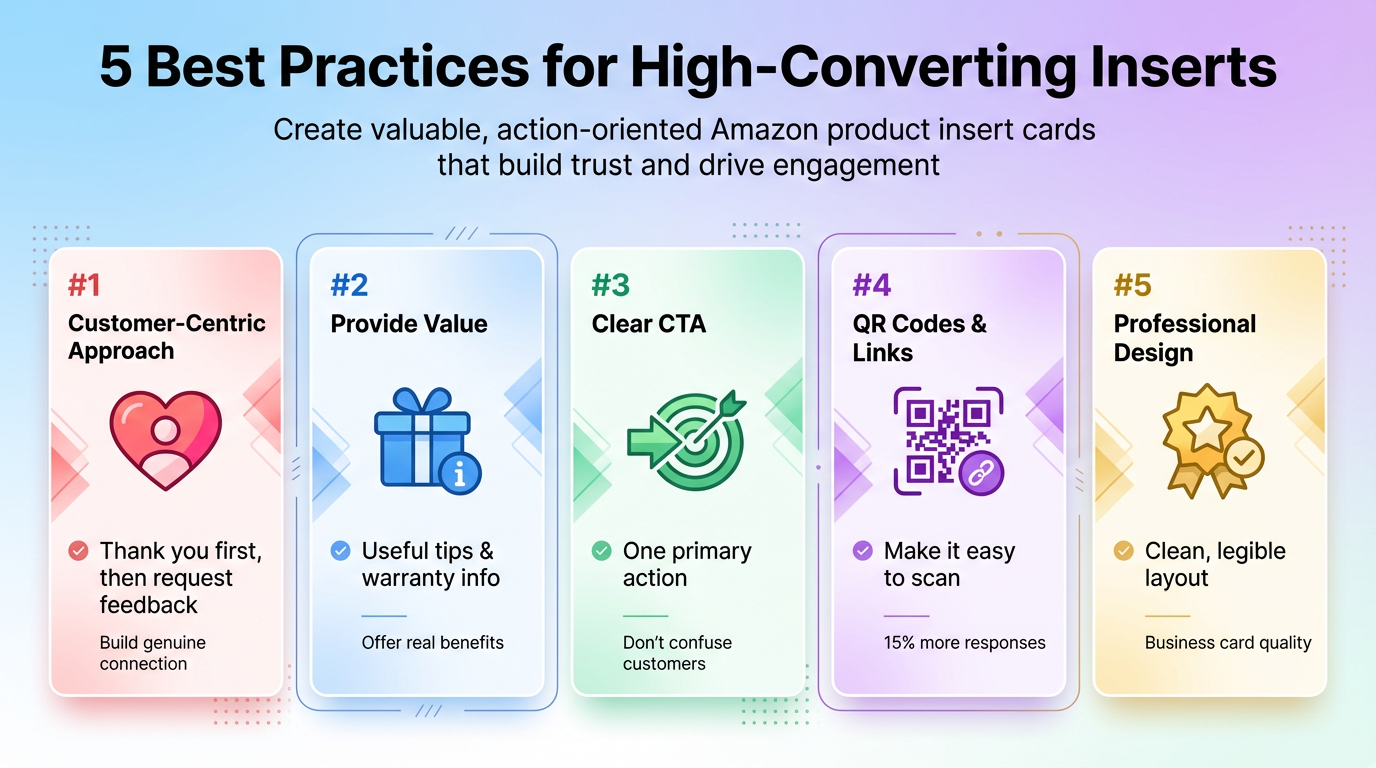
What is a "high-converting" product insert? It's one that actually motivates your customer to take the action you want, whether that's leaving feedback, registering a warranty, following your brand, etc., while also giving them genuine value. Here are five best practices to make your Amazon insert card effective and compliant:
- Keep It Customer-Centric (Not Just About Reviews): The insert should first and foremost benefit the customer. Don't make the entire card about "review us" or "give us 5 stars." Instead, open with a heartfelt "Thank you for your purchase!" and perhaps a line about your brand's mission or the quality of the product. When customers feel you care about them, they'll be more inclined to share genuine feedback. If you do ask for a review, phrase it as a request for their honest opinion to help other customers, not as a request for a perfect rating.
- Include Useful Information or Perks: Give the customer something that enhances their experience with the product. This could be tips for using the product, care instructions, troubleshooting advice, or warranty information. For example, "Remember to charge the device for 8 hours before first use" or "Hand-wash only, and avoid direct sunlight to prolong lifespan." You can also invite them to register their product for an extended warranty or VIP support. This not only provides value but also gives you a way to engage them further (for instance, via a registration page). Make sure any link or QR code for registration is clearly for product support/warranty, which Amazon allows, and not a veiled way to request a positive review.
- Use a Clear Call-to-Action: Every good insert has one main action for the customer to take. Decide what's most important for your business: do you want them to leave a review? Register for warranty? Follow your brand online? Focus on one primary CTA to avoid confusing the reader. For instance, you might say in bold text, "Your opinion matters; please share an honest review on Amazon," followed by brief instructions on how to do so. Or, if your priority is customer support, "Having an issue? Scan this QR code to get instant help or to activate your 1-year warranty." By focusing on one main action, you increase the likelihood they will actually do it. (Secondary actions can be mentioned, but they should be low-key so as not to distract from the main message.)
- Leverage QR Codes and Smart Links: Make it as easy as possible for customers to follow your call to action. QR codes are fantastic for this. A customer can simply point their phone camera at a code and be taken directly to a landing page, review page, or contact form. In fact, in one A/B test, we found that an insert card with a QR code received about 15% more responses than a similar card with only a printed web address. Scanning a code is just much easier than typing a URL! According to Amazon, it's perfectly fine to include a QR code on your insert as long as it doesn't lead them away from allowed channels or violate policies (for example, linking to your own support site or Amazon's review page is okay, but linking to an off-Amazon store or a review incentive page is not). Ensure the QR code's destination is compliant; acceptable uses might be a page that thanks them and guides them to review on Amazon, a sign-up for warranty, or a how-to video page. Also, include a short URL as a text fallback for those who prefer typing over scanning. You can use a tool like SellerSprite's URL Builder to create an Amazon-compliant, trackable link for your insert. This way, you can even monitor how many people are scanning or visiting from your inserts.
- Design for Professional Appeal: Your insert reflects your brand. Print it on quality cardstock or paper, and make sure the design is clean and legible. Use your brand colors and logo for recognition, but don't overload them with text or graphics. A good rule of thumb is to use a font size that's easy to read at arm's length and to break up text into sections (e.g., a bold headline, a short paragraph, maybe a small graphic or icon). Many successful Amazon sellers treat inserts like a business card: typically 3.5 x 2 inches or a postcard size, which fits neatly in the box without adding bulk. You can use both sides: for example, the front side could feature a large "Thank You" and your logo, and the back side could include the detailed message or instructions. If you include a discount code for future purchases, place it on a separate line or clearly apart from any review request text (never combine a coupon with a review ask in the same sentence or on the same line). And don't forget to add a personal touch (perhaps a real signature or the founder's printed name) to say thanks. This humanizes the insert and often resonates with customers.
By following these best practices, you'll create an insert that not only abides by Amazon's policies but also truly engages your customers. Remember, the goal is a happy customer first, and the positive reviews will follow naturally from that.
3 Ready-to-Use Insert Text Templates (Copy These)
Template A: "Warranty Activation & Support" (Safe Bet)
Hi there!
Thank you for choosing [Your Brand]. We hope you are loving your new [Product]! We've got you covered with a 1-Year Warranty. 📦
Activate Your Warranty: Scan the QR code or visit [YourWarrantyLink.com] to register your product and activate your warranty.
Need Help? If you have any questions or issues, please contact our support team via Amazon Messages. We're here to assist you 24/7.
Your feedback matters: if you're satisfied, let us (and others) know by sharing an honest review on Amazon. ⭐⭐⭐⭐⭐
Thanks again for being a valued customer!
– The [Your Brand] Team
Template B: "Thank You & Our Story" (Personal Touch)
Dear Customer,
Thank you for your purchase! 🙏 Your support means the world to our small team at [Your Brand].
[Your Brand] started in [Year] with a simple mission: to provide the best [product category] for customers like you. We put our heart into every product, and we hope it shows!
We'd love to hear from you. If you're enjoying your [Product], consider leaving an honest review on Amazon. It helps other customers and helps a small business grow. If there's anything not perfect, please let us know via Amazon messaging so we can make it right.
Welcome to the [Your Brand] family! We're here for you, and we hope to serve you again.
Template C: "VIP Club Invitation" (Engagement)
Hey there!
We have a little something extra for you as a thank-you for buying [Product] from [Your Brand]. 🎁
Join our VIP Club to enjoy exclusive benefits:
– 20% off your next purchase on Amazon
– First access to new [Your Brand] products
– Priority customer support and product tips
It’s free to join: simply scan the QR code to sign up, or visit [YourBrandVIP.com].
Your Voice Matters: We'd be thrilled if you share your experience with [Product] in an honest Amazon review. Your feedback helps us continue to improve.
Thank you for being a wonderful customer, and welcome to the VIP Club!
How to use these templates: Replace the placeholders (like [Your Brand] and [Product]) with your details. Double-check that any link or QR code you include is pointing to an Amazon-compliant page (registration, Amazon storefront, etc.). And of course, feel free to adjust the tone. For example, Template C uses a friendly tone with emojis to feel less formal, which can be great for some brands. Use a style that fits your audience.
How to Analyze Competitors' Inserts
Coming up with a great insert idea from scratch can be challenging. A smart strategy is to learn from your competitors, especially those who are successful and have lots of reviews or repeat customers. Here's how you can analyze and draw inspiration (or cautionary tales) from competitor product inserts:
- Look for Clues in Reviews: Customer reviews often mention the insert, either praising it or criticizing it. Some buyers even upload photos of the insert card in their review images. Go through the top competitors' Amazon listings and read the 4-star and 5-star reviews (people often mention whether they appreciated a thank-you note or helpful info), as well as the 1-star and 2-star reviews (to see if anyone was annoyed by a request or found it against policy). If you notice patterns: for example, if several customers say "They even included a coupon for my next purchase, nice touch", that’s useful intelligence. On the flip side, if you see "There was a card begging for a good review, it felt shady," you know what to avoid.
- Utilize Seller Tools for Insights: Manually combing through hundreds of reviews is time-consuming. This is where tools like SellerSprite's Review Analysis can help. For example, SellerSprite's data can aggregate common keywords in competitor reviews to show trends. Our team often uses it to find out what customers complain about or love the most in a product. If several competitors' customers mention "no instructions" as a pain point, you can be the seller who includes a handy instruction insert. If they frequently praise "beautiful packaging" or "cool bonus gift," take note: those are areas you might emulate (just ensure any bonus item doesn't violate Amazon policies).
- Order a Competitor's Product: There's no substitute for seeing it yourself. Buying a top competitor's product lets you experience their unboxing and see exactly what insert (if any) they include. This first-hand look is invaluable: you can assess the insert's quality, messaging, and effectiveness. Sometimes you'll find great ideas; other times you might be surprised by tactics that violate Amazon's rules. Use that knowledge to differentiate your approach. For instance, if a competitor is breaking the rules with an insert ("email us for a full refund if you give a positive review"), you now know you can potentially report that and also position your insert to win customers over in a compliant way ("email us with any issues and we'll take care of you", focusing on service, not buying reviews).
- Learn from Industry Communities: Engage with other Amazon sellers to discuss insertion strategies. Forums, Facebook groups, and the SellerSprite community (see below!) are filled with discussions about what works and what doesn't. Sellers often share examples of their insert cards or discuss experiments they've tried. By participating, you might discover creative ideas, such as using a QR code that leads to a personalized thank-you video, or printing a unique code on each insert to track conversions. These insights can spark ideas for your own inserts that you wouldn't have come up with on your own.
One caution: you may notice some competitors seemingly getting away with aggressive insert tactics without immediate consequences, as sellers have noted in Amazon forums. Do not be tempted to copy those bad practices. Amazon's enforcement can be delayed, but when it comes, it's severe. Always stick to the straight and narrow path we've outlined. In the long run, building a solid reputation with Amazon and customers will serve you far better than any short-term trick to grab a few extra reviews.
By analyzing others and staying informed, you can continuously refine your insert strategy. The goal is to combine the best ideas you find with your own brand's voice, and always in a TOS-compliant manner. The result? An insert that not only resonates with customers but also keeps your account safe.
FAQs
Q: What should I avoid putting on an Amazon insert card?
A: Avoid anything that violates Amazon's review policy. This includes: asking for a positive review or a high star rating, offering money or gifts for a review, telling customers to contact you privately if they are unhappy (instead of leaving a review), or directing them to buy future products outside of Amazon. Also, steer clear of emotional pleas ("It would break our hearts to get less than 5 stars") or wording that pressures the buyer. Stick to a polite thank-you, valuable info, and an honest review request, nothing more.
Q: Can I include a discount or coupon in my product insert?
A: You can include a discount code for a future purchase on Amazon, but do not tie it to a review. For example, "Here's 10% off your next order as a thank-you" is acceptable if it's just a nice perk. However, it would violate policy to say "10% off if you leave a good review." Keep the coupon separate from any review request text (ideally on the other side of the card, or clearly in a different section), so it's not misconstrued as a reward for reviewing. And ensure the code can be redeemed on Amazon, not on your own website (driving customers to an external site to purchase is not allowed).
Q: Should I use QR codes on my product insert?
A: Yes, QR codes can be very useful on inserts. Just make sure the QR code's destination is compliant. It's perfectly fine to have a QR code that takes customers to, say, the Amazon review page for your product, your Amazon storefront, a digital instruction manual, or a page to register their product warranty. All of those uses are in line with Amazon's guidelines. But a QR code that directs to an external e-commerce site, or asks the customer to take an action that violates policy, would be risky. Also, label your QR code with a short note (e.g., "Scan to activate warranty") so customers trust it.
Q: Do product inserts actually help get more reviews?
A: Yes. Done right, inserts can subtly improve your review rate. They won't magically make every buyer write a review, but they do remind happy customers to share their experience. Many shoppers need a small nudge or a convenient way to leave feedback, and a neutral, well-timed insert (opened when the customer is excited about their new product) can provide that nudge. Moreover, by improving the overall customer experience (through helpful tips or great service), you increase the likelihood of positive reviews, but remember that a great product and great customer service are the ultimate drivers of good reviews.
Q: Do I need Amazon's approval to include inserts?
A: No, you don't need any pre-approval from Amazon to put compliant inserts in your packages. As long as your inserted content follows the policies, you can include it without asking Amazon. Amazon doesn't require you to submit inserts for review. That said, it's wise to periodically double-check the current rules, as Amazon can update its policies. What's okay today will remain okay if you stick to the fundamentals (no incentives, no review manipulation).
Share Your Sourcing Journey With SellerSprite Community
Join the SellerSprite community on the Facebook Group to share your sourcing journey, ask questions, and get support from fellow Amazon sellers.
View The SellerSprite Course Directory
Ready for the next step? Open the SellerSprite Academy course directory to continue building your Amazon FBA skills chapter by chapter.
About the author
The SellerSprite Team is composed of experienced Amazon sellers, e-commerce experts, and data analysts dedicated to helping our community succeed. We share proven strategies, innovative tactics, and up-to-date insights through the SellerSprite course and blog. Our mission is to empower Amazon entrepreneurs with knowledge and tools to grow their businesses.