Ensuring Product Compliance and Improvement for Amazon FBA

2025-12-03

An image shows the process of doing a product compliance check to launching an improved product finally.

Launching a product on Amazon FBA requires careful due diligence to avoid pitfalls. In this chapter, we will cover how to verify that your product is allowed on Amazon (not restricted or prohibited), how to check for patent and trademark issues, and how to improve your product by mining competitor reviews using SellerSprite. Following these steps will help protect your Amazon business from compliance problems and give you an edge in product development.

Protect Your Amazon Launch with Confidence

Ensure your product is compliant, free from patent issues, and optimized for success by leveraging SellerSprite's tools. Start strong, avoid costly mistakes.

Start Your Product Check → 

Verifying Your Product Is Not Restricted or Prohibited by Amazon

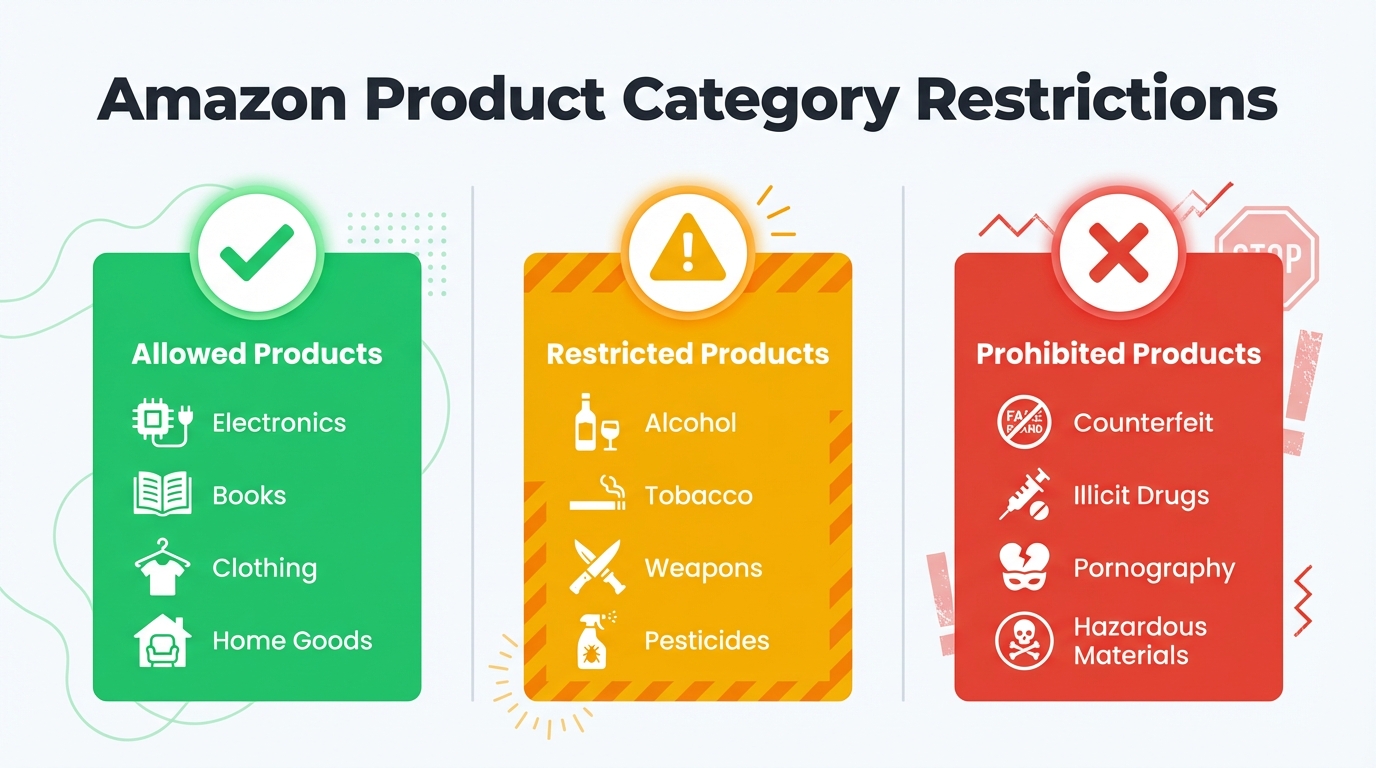
An image includes 3 types products classified according to Amazon's compliance policies.

Before you invest in a product, always confirm that Amazon permits it for sale. Amazon classifies products into open, restricted, or prohibited categories:

  • Open categories: Anyone can sell these products without special approval.
  • Restricted (Gated) categories: You need Amazon's approval (ungating) to list these items. Often, these include products with safety or regulatory considerations (e.g., certain electronics, supplements, and cosmetics).
  • Prohibited products: Items that cannot be sold at all on Amazon due to legal, safety, or policy reasons (for example, illegal drugs, explosives, recalled items).

To illustrate the difference:

Restriction Type

What It Means for Sellers

Example

Restricted (Gated)

Requires application/approval to sell

Dietary Supplements (approval required)

Prohibited

Completely banned from Amazon

Illegal drugs (not allowed at all)

Why check restrictions? Listing a restricted product without approval can lead Amazon to remove your listing, or worse, suspend your account. You must check product status before ordering inventory.

How to Check if a Product Is Restricted or Gated

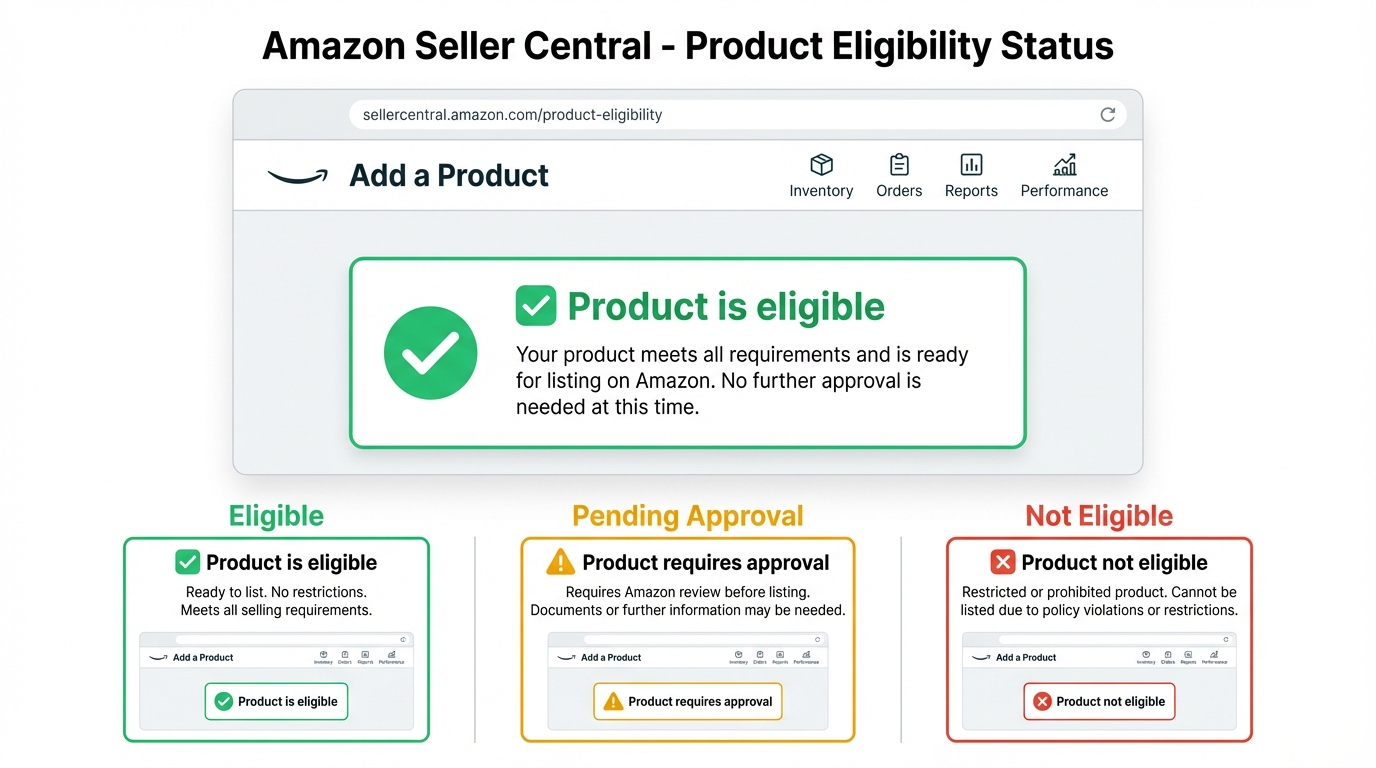
An image shows how to check whether a product is gated on Amazon.

Consult Amazon's official restricted product resources

Amazon provides lists of restricted product categories and prohibited items on Seller Central. Review these lists to see if your product or its category is mentioned. Keep in mind the lists are not exhaustive and are updated frequently as policies change. If your product falls into categories like Alcohol, Tobacco, Adult products, certain Electronics, etc., it may require approval or be disallowed.

Use Seller Central's "Add a Product" tool

A quick way to verify restrictions is to attempt adding the product to your Seller Central account. Search for the product's ASIN or name under Catalog > Add a Product. If you see a button labeled "Apply to Sell" instead of "Sell Yours," that indicates the product is in a gated category or brand. An "Apply to Sell" prompt means you must request approval, whereas a "Sell Yours" button suggests the item is open (though still be cautious, approval might be needed for certain sub-categories or brands even if the button shows up).

Check for category or sub-category gating

Even within an open category, specific sub-categories can have their own restrictions. For example, selling topical medical devices might require approval even if the "Healthcare" category is open. Always read Amazon's category guidelines for your product type. Amazon's Category Approval help pages detail which categories (e.g., Fine Jewelry, Automotive, Toys for certain ages, etc.) require ungating. Verify whether your product's category or use case requires any special approval.

Look for brand restrictions

Amazon also restricts certain brands. This means even if the category is ungated, a brand owner may have protected their brand on Amazon (often through Amazon Brand Registry) so that only authorized sellers can list those products. If your product is from a well-known brand or has trademarks (e.g., Disney, Nike), check if that brand is gated. When adding such a product, Amazon will notify you if brand approval is needed. If you plan to sell a branded product (wholesale or arbitrage model), ensure you are authorized; otherwise, consider choosing another brand or a generic version.

Be aware of hidden restrictions

Some restrictions are not immediately obvious from Amazon's public lists. For instance:

  • Hazardous materials (Hazmat): Products containing lithium batteries, certain chemicals, aerosols, magnetics, or other dangerous goods have special requirements for FBA. Even if the category is open, Amazon might restrict these items to the fulfillment network pending a safety review. Always check if your product contains any batteries or hazardous components. You may need to submit a Safety Data Sheet (SDS) and get Amazon's approval to send such goods to FBA.
  • "Ships from and sold by Amazon" only: If you notice a list where Amazon Retail is the sole seller (no other sellers), or only a couple of sellers are offering it despite high demand, it can indicate a restriction. Amazon often reserves certain products for itself or for authorized vendors. In other words, the product might be technically sellable on the site but gated to most third-party sellers.
  • Previous listings vs. new listings: Sometimes, you might see a product for sale on Amazon that is now restricted to new sellers. This could happen if rules changed or if existing sellers were grandfathered in. Do not assume you can sell a product safely just because it's currently listed by someone else. Always double-check current policy. Amazon's rules apply to you as a new seller even if an older listing exists.
  • Seasonal and regional restrictions: Some products are permitted in certain marketplaces or at times of year but not others. For example, a particular pesticide might be allowed on Amazon US with EPA compliance but completely prohibited on Amazon EU. Or toys might be gated during Q4 for new sellers. Be mindful of where you plan to sell (US, EU, etc.) and check the specific restrictions for that marketplace.

Tip: A useful habit is to use the Amazon Seller mobile app or Seller Central to scan the product's barcode/ASIN before sourcing. The system will tell you if the item is "Requires Approval" or "Restricted" for your account. This real-time check can save you from buying unsellable stock.

Tip: Document your checks. Keep a log (with date) of the Amazon policy pages you consulted or screenshots of the "Sell Yours" or "Apply to Sell" indicator. Amazon's policies can change, and having proof that you checked can be useful if a product's status changes later.

Finally, if you discover that your product falls into a restricted category but is not outright prohibited, you can apply for approval (ungating). Approval usually involves providing documents like invoices from authorized suppliers, certificates (e.g., safety certificates for toys), or other evidence of compliance. If you're set on selling in a gated category, research the exact requirements and be prepared to meet them. Otherwise, it may be wiser to choose a different product to avoid delays and complications.

Important: Never attempt to sell a prohibited item. If Amazon catches a prohibited product listing, it will be removed, and your account could face immediate penalties. Even for restricted products, do not try to slip through without approval. Amazon actively monitors and will shut down such listings, potentially suspending your seller account for repeated violations. It's not worth the risk to your business.

How to Check for Patents (Utility and Design) to Avoid Infringement

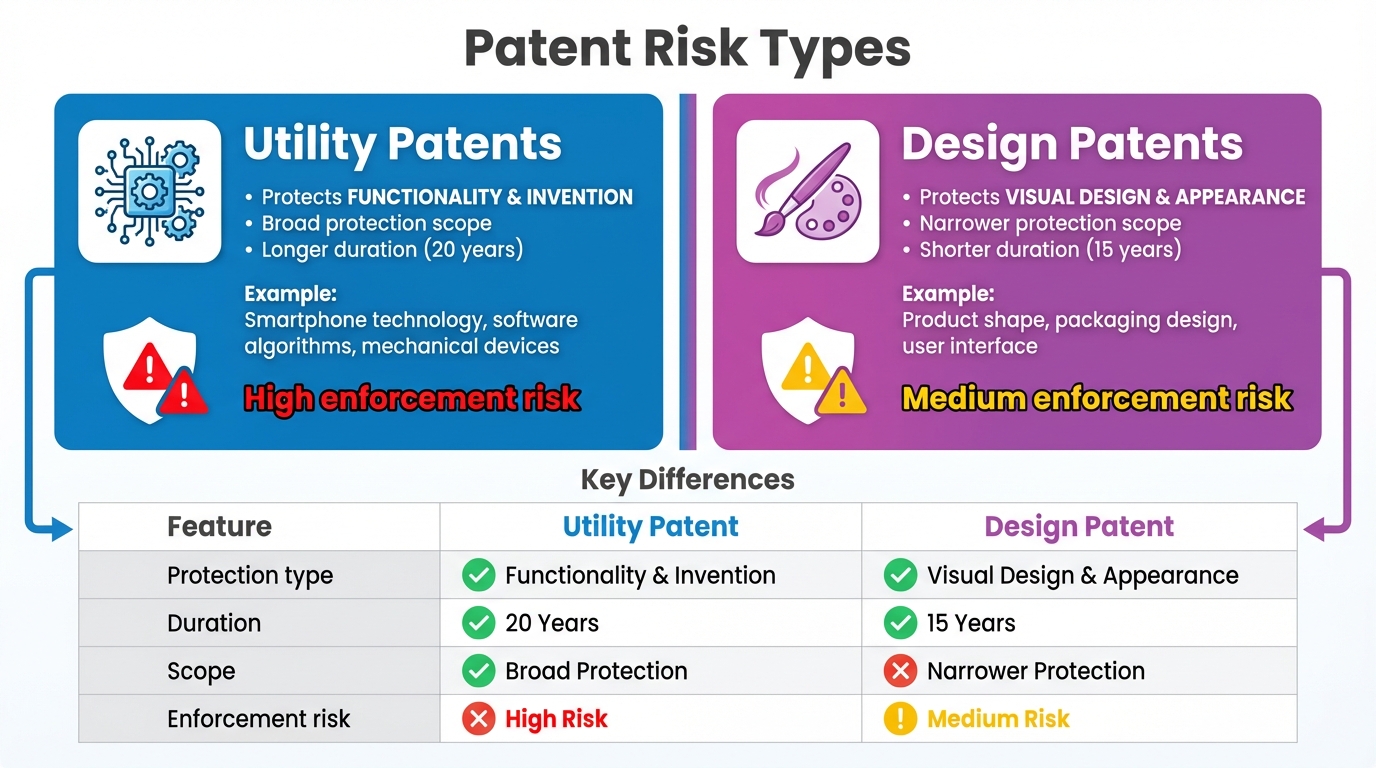
An image compares and shows the difference between 2 patent types, including utility patent and design patent.

When you develop or source a product, you must ensure you are not violating someone else's patent. Patents grant inventors exclusive rights to their inventions or designs for a period, and selling a product that infringes an active patent can lead to legal action or an Amazon takedown. There are two main types of patents to be aware of:

  • Utility Patents: These cover functional aspects of how an invention works. If a product has a novel mechanism or process, it could be protected by a utility patent (valid ~20 years from filing). Example: a new type of bottle-opening mechanism could be utility-patented, meaning no one else can make a bottle opener that uses the same mechanism without permission.
  • Design Patents: These protect the unique ornamental design or appearance of a product (not its function). Design patents in the US last 15 years from issuance. For example, a company might patent the distinctive shape or surface pattern of a kitchen gadget. Even if you create a product with the same function, copying that specific look could infringe on a design patent.

Why patents matter: If you inadvertently sell a patented product, the patent owner can file an infringement claim. This can result in Amazon pulling your listing, destruction of your inventory, legal cease-and-desist letters, or expensive lawsuits. Big brands and inventors do monitor Amazon for knockoffs of their patented designs. Thus, checking for existing patents is a critical step before finalizing your product idea. SellerSprite provides a Design Patent verification tool exactly for Amazon sellers to check if they would infringe on certain design patent when designing their products, and you may leverage it if you need.

Steps to Conduct a Patent Search

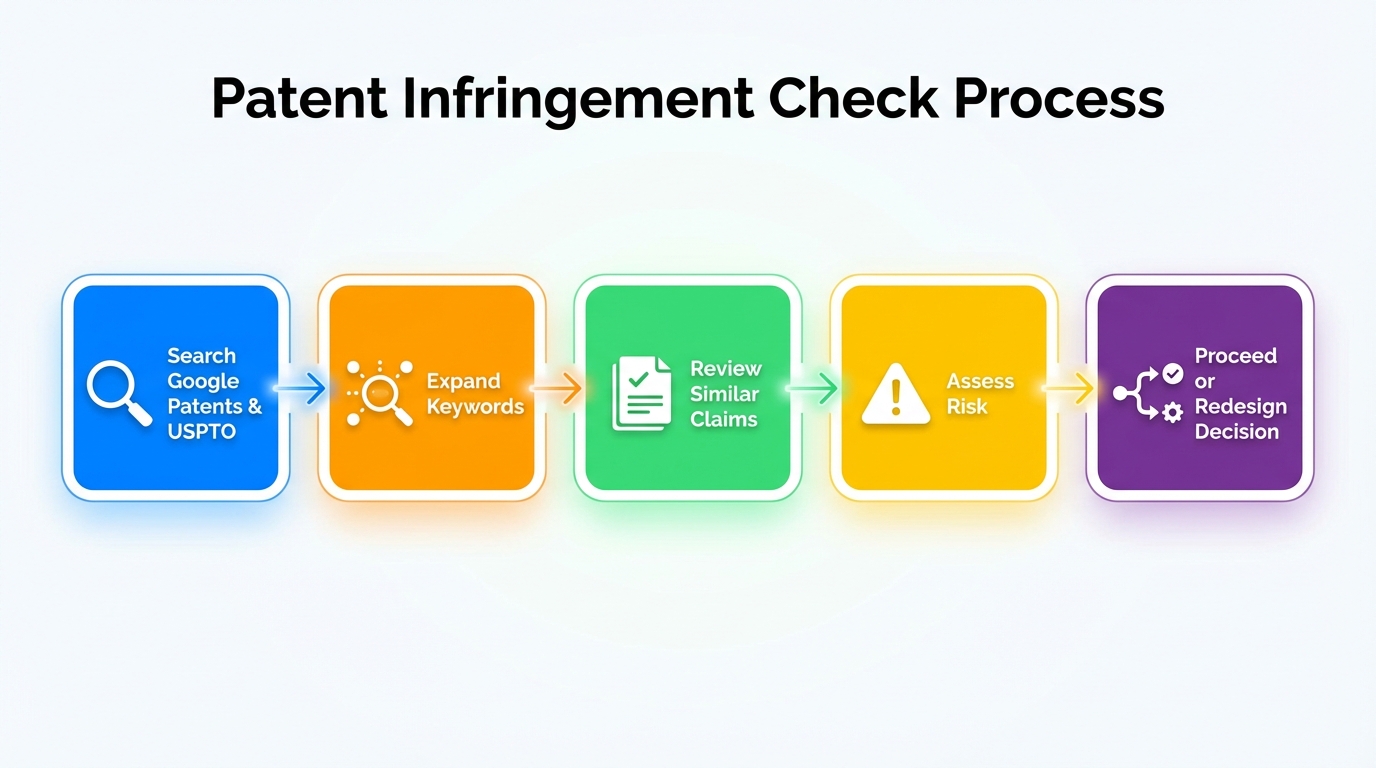
An image shows how to conduct a patent search.

1.Search on Google Patents

A great starting point is Google Patents, a free search engine for patents worldwide. It has a user-friendly interface and allows keyword searches for millions of patents. Start by entering broad keywords related to your product's concept or features (not the brand name). For example, if you invented a new kind of footrest for toilets, search terms like "toilet footrest patent" or just "toilet footrest" to see what comes up. Google Patents will show you existing patents and published applications that match those terms. Skim the results for any product that looks similar to yours.

2.Search the USPTO Patent Database

For thoroughness, search the United States Patent and Trademark Office (USPTO) patent database as well. The USPTO's Patent Public Search (formerly a patent search interface like TESS) is the official source for all U.S. patents and applications. It may be less user-friendly than Google Patents, but it's comprehensive and authoritative. If Google Patents didn't reveal anything obvious, use the USPTO search to double-check. You can search by keywords or by patent numbers if you find some on Google that you want full details on. The USPTO database is also useful if you want to narrow results by classification or date. (Note: Many foreign patents will also appear on Google Patents. If you plan to sell internationally, consider checking patents in those specific markets as well.)

3.Use broad search terms and variations

When searching, think of different ways to describe your product. Patented inventions might not use the same marketing terms you do. Use broader terms for the category or function. For example, instead of searching "ergonomic snow shovel with LED light patent," search "snow shovel patent" and "shovel with light patent" separately. The idea is to catch patents that cover the core idea, even if details differ. Also, try synonyms or related concepts. If your product is a type of organizer, search "storage organizer patent" or "adjustable shelf patent," etc. Spending time on multiple searches increases the chances you spot relevant patents.

4.Check competitor or industry websites

If a competitor product exists, check whether that company lists any patent numbers on its packaging, manual, or website. Often, companies proudly display their patent numbers or mark products as "Patent pending" in product listings. For example, the Squatty Potty (toilet footrest) company mentions its design patent on its site. A quick visit to a known brand's website or even a glance at product images can reveal patent info. If you find a patent number, you can look it up on Google Patents or USPTO to read its claims and scope.

5.Analyze the results

If your searches find patents that seem close to your product, read the abstract and drawings to see if the product is essentially the same. Focus on the claims section of utility patents; that's the legal definition of what's protected. It can be technical; if you're not confident, professional help is wise. For design patents, compare the images to your product design; if they look very similar, that's a red flag. You may need to modify your design to avoid infringement or choose a different product if there's a broad patent blocking your idea.

6.Consult a patent attorney or expert if needed

Patent law can be complex. If you have any doubt, it's worth consulting an intellectual property (IP) attorney to do a professional patent search and opinion. They can confirm if your product might infringe on an existing patent or give you peace of mind that you're in the clear. Yes, it's an extra cost, but far cheaper than a lawsuit. Even hiring a freelancer or specialist for a patent search can help if an attorney is out of budget.

Summary of patent search: Start with Google Patents (easy to use) and then cross-check on USPTO for thoroughness. Use broad keywords to cast a wide net. Check competitors for any patent claims. When in doubt, get professional advice. Only proceed with your product once you're confident it doesn't violate others' patent rights. If you discover a patent conflict, you might need to redesign your product or pick a different opportunity.

How to Check for Trademarks to Avoid Infringing Brand or Design Rights

In addition to patents, you must ensure your brand name, logo, or slogan isn't infringing someone else's trademark. A trademark is essentially the legal term for a brand identifier. It can be a word, phrase, symbol, design, or even a sound or smell that distinguishes a business's goods. For Amazon private label sellers, trademarks most often concern the brand name you put on your product and packaging, or any unique product name you coin.

Why trademarks matter

If you launch your product under a name that's already trademarked by someone in a related category, you could quickly get into trouble. The trademark owner can file a complaint with Amazon or send a legal notice demanding that you stop using the name. Amazon might remove or suppress your listing for trademark infringement, resulting in lost sales and requiring a rebrand. Rebranding after you've launched is costly and can waste all the marketing effort you put into the original name. It's crucial to choose a brand/name that is free and clear from the start.

8 Steps to Conduct A Trademark Clearance Search

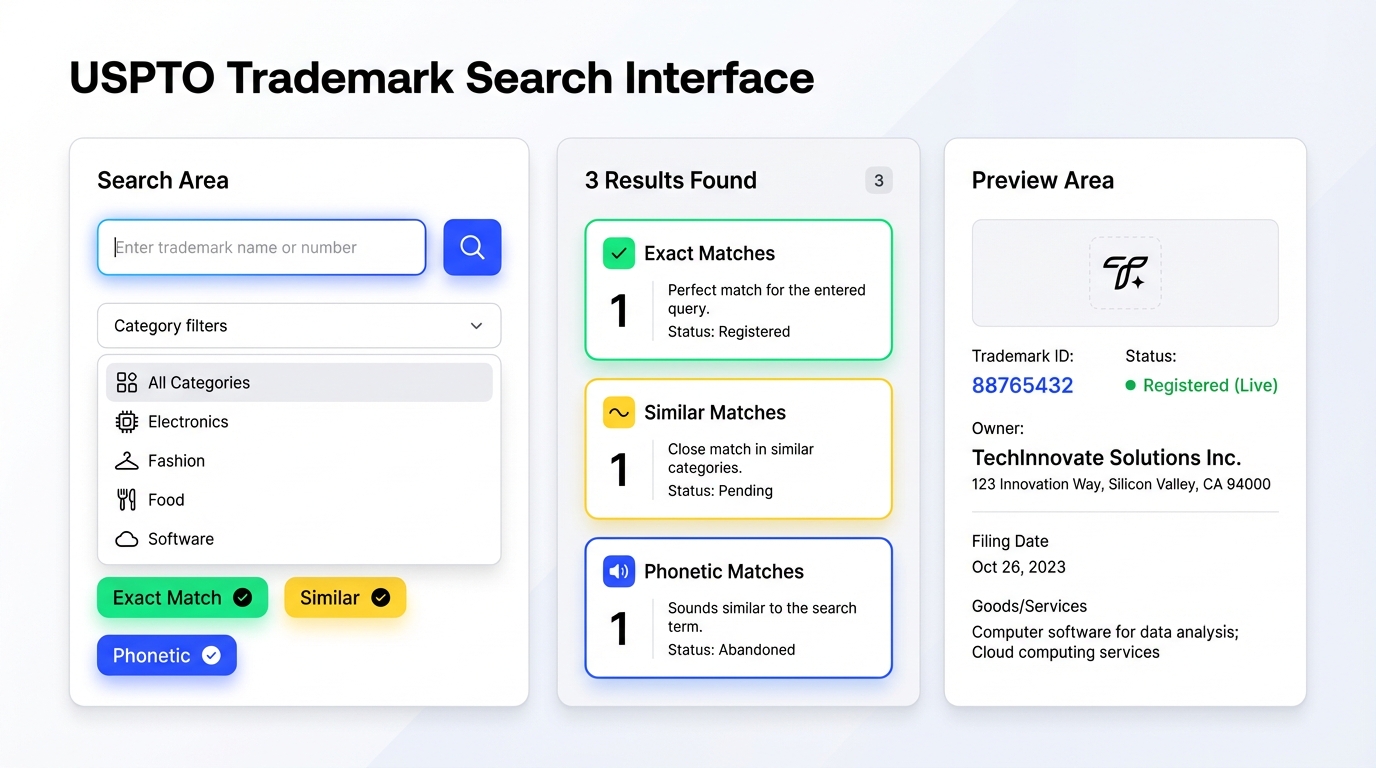
An image shows how to conduct a trademark clearance search.

Here are the steps to conduct a trademark clearance search for your potential brand or product name:

1.Brainstorm and narrow down name options

Come up with a few different name ideas for your brand or product line. Be creative and try to coin something unique. The more unique the name, the easier it will be to trademark and the less likely it is to conflict with an existing brand. Avoid obvious generic names or famous brand names (e.g., don't name your electronics brand "Sonyy", which is too close to Sony, for example).

2.Search the USPTO trademark database

The primary resource for U.S. trademarks is the USPTO's Trademark Electronic Search System (TESS). This is an online database of all federal trademark applications and registrations. You can access it for free on the USPTO website. Start with a Basic Word Mark Search for your exact name and similar names. For each name idea, search not only the exact spelling but also variations (for example, if your brand idea is "StairMaster Gear," also search "Stair Master" or "StairMaster" alone). The goal is to see if anyone in a similar product category has a trademark that's identical or confusingly similar. Pay attention to the Class of goods/services in the results. If you find a similar name but it's registered in an unrelated class (e.g., your name matches a registered trademark for a software company, and you're selling kitchen utensils), there might not be a conflict. However, anything in the same or related class as your product category is a potential issue.

  • The USPTO search interface allows for advanced options. If you want to search for logos or designs, you can use the image code search. But for most private label sellers, focusing on word marks is sufficient (since you typically create a unique logo, you just need to ensure the name is safe).
  • Example: If you plan to call your brand "Nikonic" for camera accessories, a USPTO search for "Nikonic" might show no exact matches. But also notice it's very close to "Nikon" (a famous camera brand). Nikon is a trademark, so "Nikonic" could be considered confusingly similar and risky. It's best to avoid names that play on established brands. In general, steer clear of famous trademarks entirely in your names.

3.Check common law usage via Google

Not all businesses register their trademarks federally, especially smaller brands. Do a Google search on your proposed name. See if any company or product (even if not on Amazon) is already using it. If you find a business using the name in a similar industry, even without a ® or ™, you might want to avoid that name to prevent future disputes. Also, search on Amazon itself by typing the name in the search bar and see if products or brands pop up. If your exact name or a very close one is already in use on Amazon for similar products, pick a different name to avoid customer confusion (and potential trademark complaints).

4.Search on other platforms

It can help to check domain name availability and social media handles for your brand name. This is not a legal requirement, but if the .com domain of your brand is taken by another business, that's a sign the name might be in use. Websites like Namechk can search many platforms at once. While not all uses will be trademarks, a heavily used name is less ideal for building a unique brand presence.

5.Consider international markets

If you plan to expand into other countries' marketplaces (Europe, etc.), also check those trademark databases (like the EUIPO for Europe) or at least ensure your name doesn't accidentally mean something bad in another language.

6.Choose a safe name

After gathering the above information, evaluate which name is the cleanest, which has no identical or confusing trademarks in your category, and no heavy usage by others. Ideally, your brand name should be distinctive. Once chosen, you can move forward with confidence that you won't immediately infringe someone's rights.

7.(Optional) File your own trademark

While not required to start selling, registering your trademark is highly recommended as you grow. It gives you legal protection and access to Amazon's Brand Registry (which unlocks marketing benefits on Amazon). You can file a trademark yourself or through an attorney. However, note that you do not need an active trademark on day one to sell on Amazon; you just need to ensure you're not infringing on others at the start. You can file for your trademark once you're committed to the brand and know the name is clear.

8.Consult a trademark professional if unsure

Just as with patents, if you're not confident in conducting the search or interpreting the results, you can hire a trademark attorney or a professional search firm to conduct a "clearance search" for you. They may catch confusingly similar marks you might overlook (for example, phonetic similarities or foreign language equivalents). This can save you from future headaches.

Key points to remember: A trademark can cover names, logos, and slogans, anything that identifies the source of a product. Two companies can have the same name in different industries, but on Amazon, you typically operate in the realm of physical goods, so conflicts with any consumer product brand are important to avoid. If you skip this step and accidentally use a trademarked name, you risk a scenario where, after you launch, you receive a notice that you're infringing and you must pull all your products and rebrand. That can be devastating for a new seller in terms of cost and lost time. It's far better to spend a few hours upfront doing a thorough trademark search and picking a unique brand name.

Product Improvement Through Review Mining Using SellerSprite

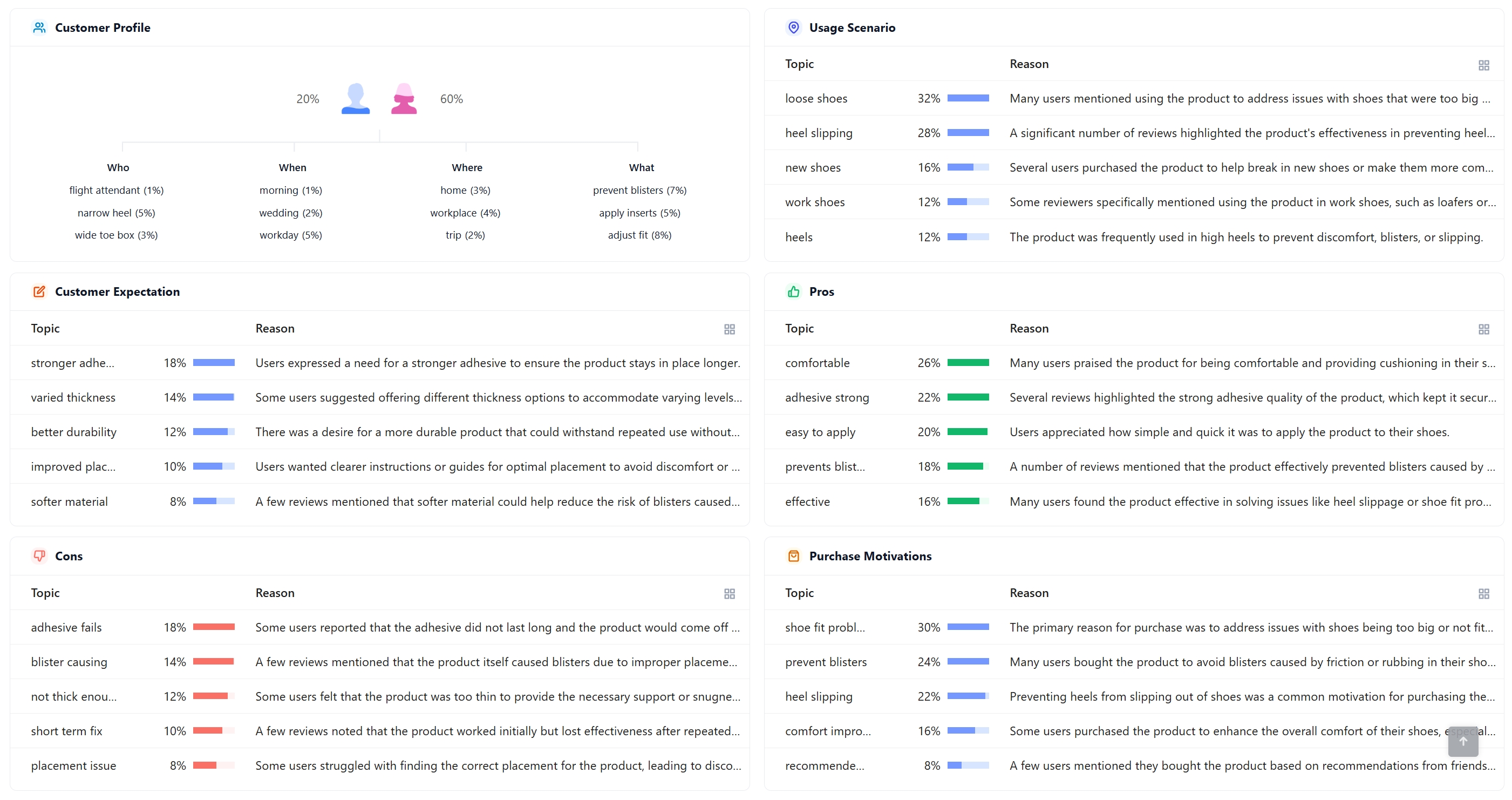
A screenshot shows how to do Amazon review analysis by SellerSprite

Once you've ensured your product is compliant and your brand is safe, the next step is to make your product as successful as possible in the marketplace. One of the best ways to do this is by leveraging customer reviews, not just on your own products (if you have any yet), but on your competitors' products. Review mining means analyzing reviews of similar products to gather insights into what customers like, dislike, and wish were better. This data is a goldmine for improving your product design, quality, and marketing. In this section, we'll focus on how to effectively mine reviews using SellerSprite, an Amazon seller tool that offers a Review Analysis feature.

Why Analyze Competitor Reviews?

A screenshot shows how to analyze Amazon reviews from multiple aspects with SellerSprite.

Imagine learning from every mistake and every win of your competitors' products without having to experience them yourself. That's what review mining offers. By scanning through reviews (especially the detailed feedback in 1~3-star and 4~5-star reviews), you can spot patterns and recurring themes. SellerSprite's Review Analysis tool helps automate and organize this process:

  • It can analyze positive vs. negative reviews in bulk and detect trends. For example, repeated complaints about a feature.
  • It can extract keywords from reviews, showing you which words or features customers mention most.
  • It even uses sentiment analysis to gauge overall feelings and highlight common pain points.
  • Ultimately, it generates insights to improve your product or listing based on real customer feedback.

In short, review mining reveals what your target customers care about. What they love, what frustrates them, and what they wish they had. You can then use those insights to make a superior product and craft a compelling listing.

Using SellerSprite for Review Mining: Step-by-Step

A screenshot shows the result page of SellerSprite's Review Analysis feature.

Follow these steps to systematically mine reviews and turn them into actionable improvement ideas:

1.Identify key competitor products

In SellerSprite, use the Review Analysis tool (available via their web platform or Chrome extension) to load the ASINs of your top competitor products. Focus on products that are selling well in your niche; they will have many reviews to learn from. Also include products similar to what you plan to sell (in terms of features, price range, etc.). SellerSprite allows you to compare multiple ASINs' reviews side by side, which can be helpful.

2.Gather and filter reviews

Once SellerSprite has pulled in the review data, take advantage of its filters. You can filter by star rating (e.g., look at all 1- and 2-star reviews to see common complaints, then 4- and 5-star reviews to see what people love). You can also filter by date to see if issues are ongoing or are just early problems. SellerSprite's tool can automatically highlight frequently mentioned keywords or issues. For example, it might show that "handle" is a frequently used word in 1-star reviews of a competitor's vacuum cleaner, indicating that many people had issues with the handle.

3.Identify recurring issues (pain points)

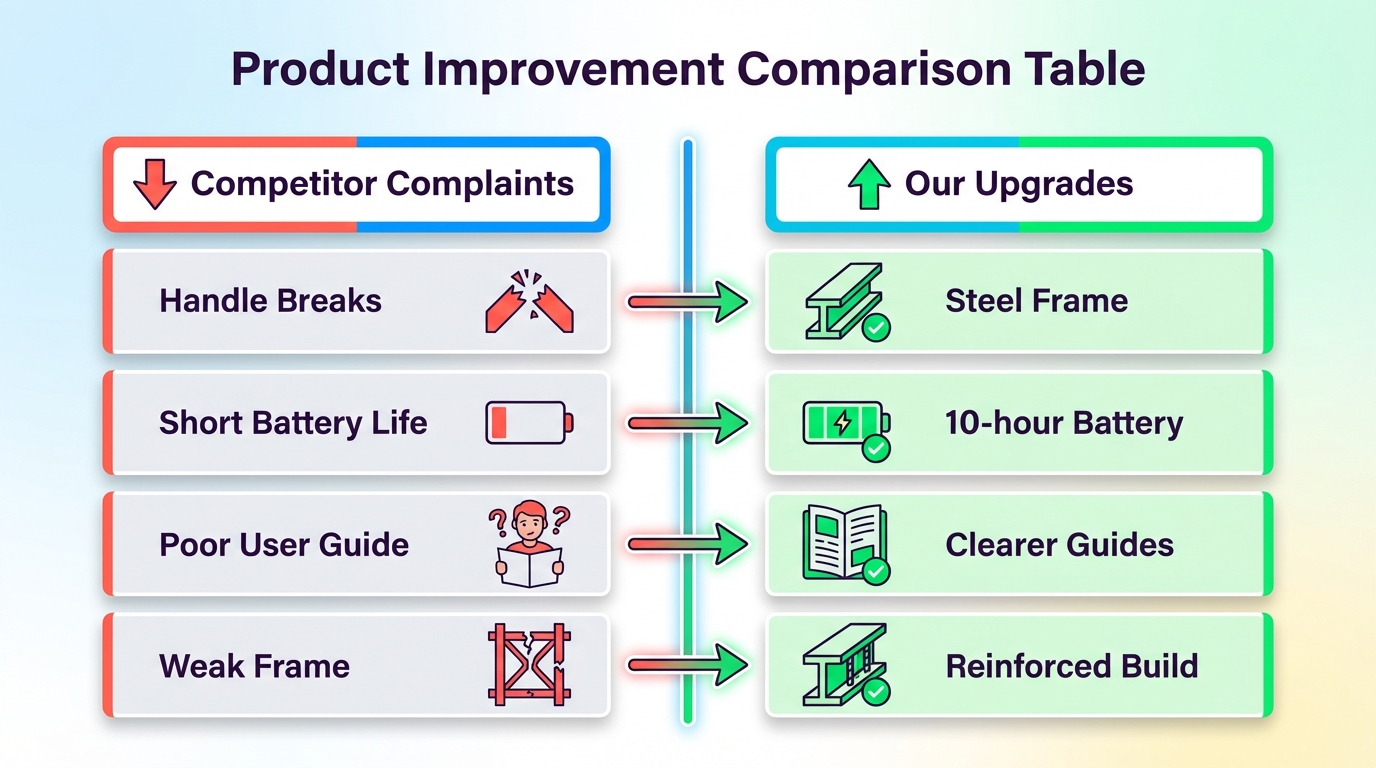
Read through the negative reviews and note the problems that appear repeatedly. These are the pain points you could fix in your own product. For instance, you might discover a pattern like: "The handles need to be stronger," indicating that dozens of customers complain that the handles of a competitor's product broke or are too flimsy. That's a clear signal that the handle's durability is a weakness. Another example: "Very convenient, but the battery dies quickly", indicating the product's battery life is insufficient for many users. List out these recurring complaints, spot the top issues, and confirm those complaints are not one-off flukes but true systemic problems.

4.Identify recurring positives (loved features)

Equally important, look at the positive reviews (4★ and 5★) to see what features or benefits customers rave about. These are the things you must not lose in your product and should likely emphasize. For example, customers might repeatedly say, "This ladder is great for stairs, super stable on uneven steps!" or "I love how lightweight it is; I can carry it anywhere." These tell you the aspects of the product that are truly valued. If "great for stairs" comes up often, you should ensure your version of the product maintains that stair-friendly design. If "lightweight" is a selling point, make sure your product isn't significantly heavier, or, if it is, that you have a trade-off that justifies it. SellerSprite can extract common positive phrases, so you can systematically see what customers like most.

5.Compile an improvement list

Now, take those findings and create two lists for your product development:

  • Improvements to make: Address the common complaints directly. For the "handles need to be stronger" example, you would plan to use a more robust material or design for your product's handle. If people complain that a competitor's item is too small, consider offering a larger size or clearly communicating the dimensions. Each major pain point is an opportunity for you to differentiate your product by doing it better. Even minor issues like "the packaging was hard to open" or "the manual was unclear" can be improvements you implement (easy wins like providing a better manual or packaging).
  • Features to highlight or retain: These come from the positives. Ensure your product retains the beloved features of competitors (if relevant) and highlight them. If "great for stairs" is a big plus, incorporate that into your product usage and showcase that in your marketing (e.g., product photos demonstrating use on stairs, copy that says "Stair-friendly design for multi-level homes"). If "sleek design" is loved, make sure your design is indeed attractive.

6.Implement in product design and sourcing

Communicate the needed improvements to your supplier or manufacturer. For instance, "Our research shows competitor handles break. We need a thicker gauge steel for the handle and better attachment screws." Work out these changes in the sampling stage. If certain features need to be added (maybe customers all wish the product had an extra accessory or adjustable setting), see if you can incorporate that. Essentially, you are tailoring your product specs based on real user feedback from similar products.

7.Update your marketing copy and images

Use the review insights not only in product development but also in how you present your product:

  • Copywriting: Address common concerns proactively. If a common complaint on other products was "setup was confusing," highlight in your bullet points that "Easy 5-minute assembly, no tools required" (assuming you have made it easy). Use the language customers use; if they consistently use a certain word or phrase to describe a benefit or problem, mirror that wording in your listing, so it resonates. SellerSprite's keyword extraction from reviews can supply you with authentic customer language to sprinkle into your bullets and description. For example, if many customers say "extremely durable" as a form of praise, you might say "built with an extremely durable frame" in your copy.
  • Images/infographics: Consider creating an infographic image that literally calls out how your product addresses the top 3 issues people had with others. E.g., "Reinforced Handle, Won't Break Under Pressure" next to an image of your improved handle, or "Long-Lasting Battery: up to 10 hours use" if battery life was a complaint. Also, highlight the beloved features: if portability was praised, have an image showing a person easily carrying the item. If being "great on stairs" is a selling point, include both the visual and the text. These marketing points will directly target the pain points and desires that you now know customers have, making your listing much more convincing.

8.Monitor your own reviews once you launch

The process doesn't end after product development. Once you start selling and gather your own customer reviews, use SellerSprite to analyze them as well. This will help you catch new issues early and continually improve your product, listing/customer service over time. It's an ongoing feedback loop: feedback -> improve -> feedback -> improve, which is key to long-term success on Amazon.

By using SellerSprite to systematically analyze reviews, you remove much of the guesswork from product development and marketing. You're basing decisions on actual data, which is the voice of the customer. This can give you a significant competitive advantage. You'll be able to say, "Our product solved X problem that others had", which can be a compelling pitch in your marketing and result in higher customer satisfaction.

SellerSprite's Review Analysis essentially serves as an Amazon review checker, helping you uncover these insights quickly. It lets you see what customers love or hate about competing products, so you can strategically position your product better. Many successful Amazon sellers credit review mining as a crucial step in creating products that generate positive reviews from day one. After all, you're delivering what customers already told the market they want.

Conclusion

An image shows how to verify a product compliance before launching it on Amazon.

In this chapter, we covered critical pre-launch steps for Amazon FBA success:

  • Product Restrictions Check: Ensure your product isn't prohibited or gated on Amazon. Use Amazon's resources and Seller Central tools to verify your product's status. Never list items in violation of Amazon policy, as the risk to your account is too great.
  • Patent Search: Do your homework to avoid patent infringement. Use Google Patents and the USPTO database to search for existing utility or design patents related to your product. If a similar invention is patented, consider designing a workaround or choosing a different product. When in doubt, consult a patent professional.
  • Trademark Search: Choose a brand/name that you can own. Search the USPTO trademark database for any similar names in your category and do general online checks. It's far easier to pick a unique name now than to rebrand after a legal complaint. Secure your brand identity from the start to build a lasting business.
  • Review Mining for Improvement: Leverage SellerSprite to analyze competitor reviews at scale. Identify what to fix and what to feature in your product. If customers say, "handles need to be stronger," you'll make them stronger. If they love that a product is "great for stairs," you'll make sure to keep that benefit and shout it from the rooftops. Use these insights to develop a better product and craft marketing that hits the bullseye of customer needs.

By diligently performing these checks and research tasks, you are de-risking your Amazon venture. You avoid products that could get you suspended or sued, and you increase the odds of launching a product that earns positive reviews and outshines the competition. This upfront work might seem time-consuming, but it's an investment in building a sustainable and profitable FBA business. Always remember: an hour spent on research can save you months of trouble down the line.

Proceed to the next chapter, where we will delve into sourcing strategies, now that you have a vetted product idea with strong improvement angles. Happy selling and may your product be compliant, differentiated, and loved by customers!


Build a Safer, Smarter Product Before You Launch

Spot restrictions early, avoid IP risks, and turn competitor reviews into your product's next big upgrade with SellerSprite. Your best launch starts with better research.

Try SellerSprite Now → 

Continue Your Learning Journey

Visit the Course Directory to view all available chapters of the SellerSprite Amazon Seller Beginner to Master Course and jump to the section you need.

Open Course Directory → 

User Comments
Avatar
  • Add photo
log-in
All Comments(0) / My Comments
Hottest / Latest

Content is loading. Please wait

Latest Article
Tags