TL;DR: Master the art of Amazon Title Optimization to balance A9 algorithm ranking factors with human-centric click-through rates, ensuring your products are both findable and irresistible.
Key Takeaways
- Prioritize the first 70-80 characters for mobile users to prevent critical information from being truncated.
- Balance high-volume keywords with high-relevance features to satisfy both Amazon's SEO and the customer's intent.
- Avoid promotional language like "Best Seller" or "Free Shipping," which can lead to suppressed listings.
Table of Contents
Note on marketplaces: This guide is specifically optimized for the US market.
The Strategic Importance of Amazon Title Optimization
In the hyper-competitive Amazon US marketplace, your product title is the single most influential factor for both your search engine visibility and your Click-Through Rate (CTR). Amazon Title Optimization is not just about stuffing as many keywords as possible into a 200-character limit; it is about creating a clear, concise, and compelling value proposition that tells a shopper exactly why they should click on your listing over a competitor's. For a deeper dive into the full spectrum of listing management, check out our Amazon SEO and Listing Optimization: The 2026 Ultimate Guide.
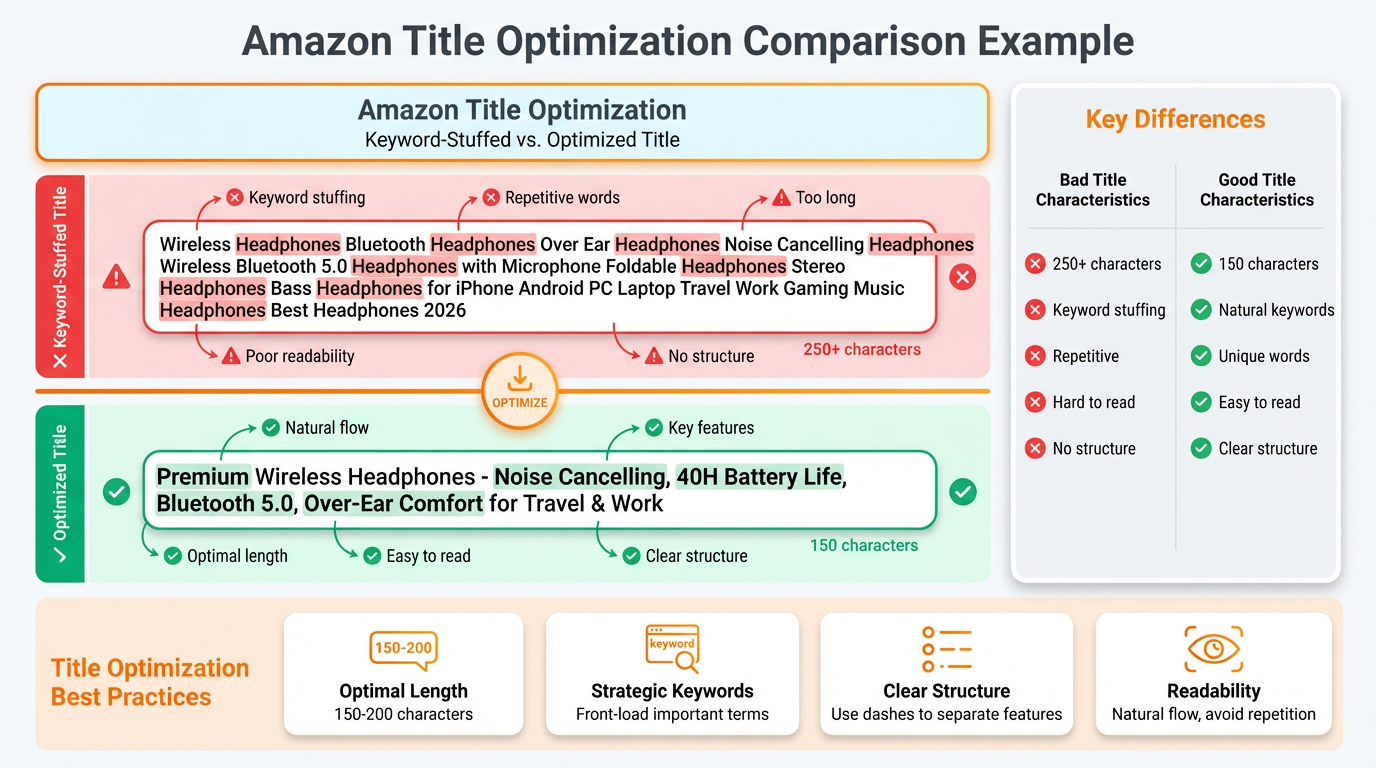
The Amazon algorithm (A9/A10) places more weight on the title than on bullet points or descriptions. Therefore, if your primary keywords are missing from the title, your chances of ranking on the first page are significantly diminished. However, a title optimized solely for bots often fails to convert humans. Growth-oriented sellers must find the "Golden Ratio" where SEO requirements meet consumer psychology.
Keyword Research: The Foundation of SEO Titles
Effective Amazon Title Optimization begins with rigorous Amazon Keyword Research. You need to identify three tiers of keywords: Core (high volume), Secondary (descriptive), and Long-tail (high conversion). Using data-driven tools allows you to see exactly what shoppers are typing into the search bar. You should prioritize keywords that have high search volume but are also highly relevant to your specific product features. For instance, if you are selling a "Stainless Steel Water Bottle," adding "Leak-Proof" and "BPA-Free" captures specific user intents that drive higher quality traffic.
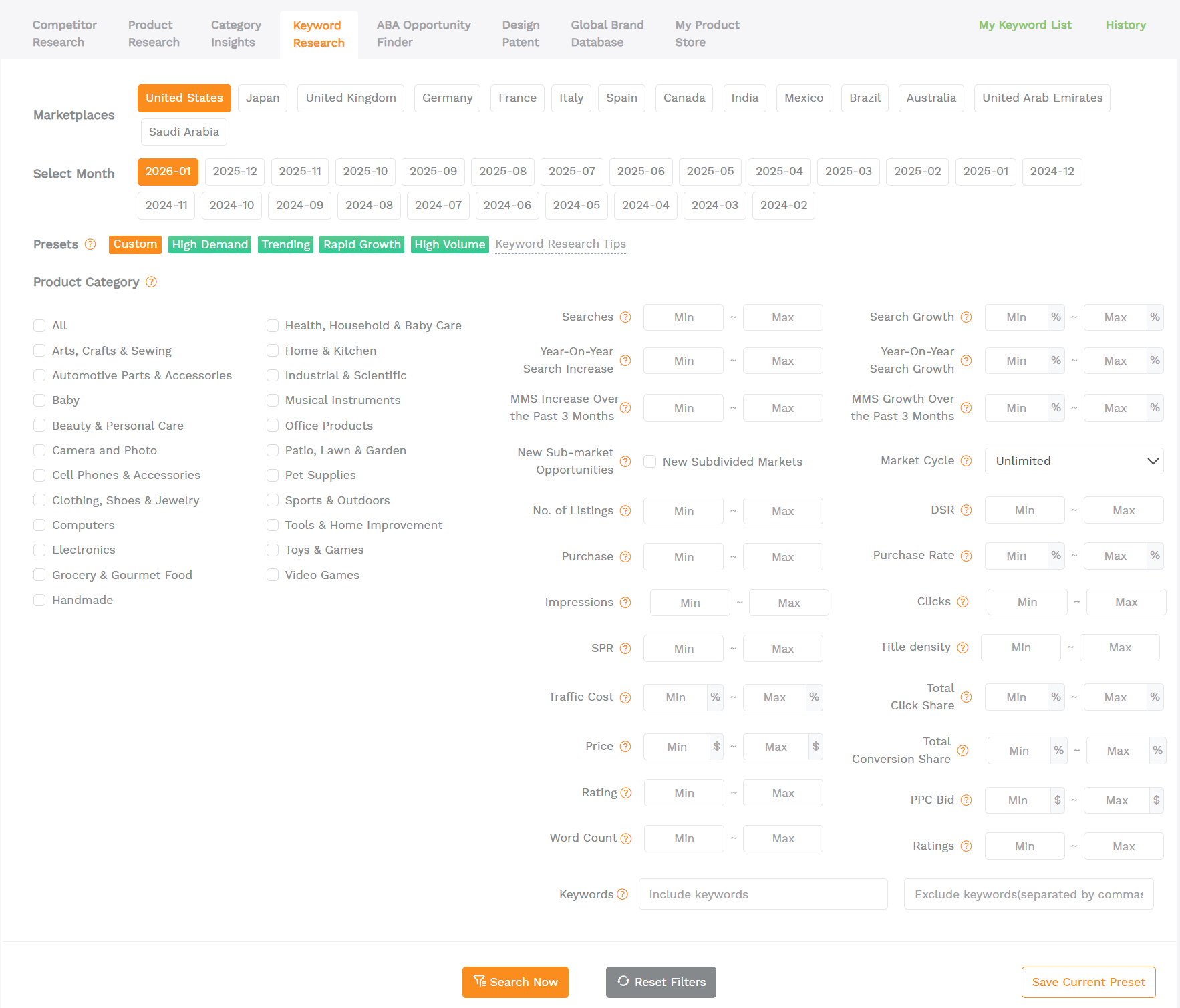
Once you have your keyword list, the placement matters. The most important keywords should appear within the first 5-10 words. This ensures that even if the title is truncated in search results or on mobile devices, the core relevance is immediately communicated to the shopper. Remember that Amazon's algorithm rewards "Exact Match" phrases more than individual keywords scattered throughout the title.
Product Title: Best Practices & Formatting
To maintain a professional brand image and avoid suppression, you must follow Amazon’s strict style guidelines. Generally, a high-performing title follows this structure: [Brand] + [Model/Series] + [Main Material/Feature] + [Product Type] + [Color/Size/Quantity]. For example: "HydroFlask Wide Mouth 32 oz Water Bottle - Stainless Steel, Vacuum Insulated - Arctic White." This format provides all necessary technical data while remaining readable.
Key formatting rules include: Capitalize the first letter of every word (except for prepositions like 'and', 'or', 'for'), use numerals (2 instead of two), and avoid symbols like exclamation points or HTML tags. Most importantly, do not use subjective claims like "Best Seller" or "Top Rated," as these are time-sensitive and violate Amazon's policies. When running Sponsored Products, consider these 3 tips for optimizing the Amazon ad title to maximize your ad spend efficiency.
Mobile-First Title Optimization Strategies
Over 50% of Amazon purchases are now made on mobile devices. This shift in consumer behavior requires a mobile-first approach to title optimization. On the Amazon mobile app, titles are often truncated after approximately 70-80 characters. If your brand name is excessively long or if you waste those first 80 characters on fluff, the customer may never see the defining feature of your product (e.g., "Compatible with iPhone 15").
To optimize for mobile: 1. Place the most unique selling point (USP) immediately after the brand and product type. 2. Use parentheses or dashes to separate ideas, which helps with visual scanning. 3. Test how your title looks on various screen sizes using a mobile simulator. By front-loading value, you increase the likelihood of a click even when the full title is hidden.
Using Tools for Advanced Listing Optimization
Manual optimization is time-consuming and prone to human error. Professional sellers use specialized software to ensure their titles are technically perfect. To streamline this process, use the SellerSprite Listing Builder to craft your titles with real-time SEO feedback. This tool allows you to import your keyword bank and see exactly which terms are utilized, preventing keyword stuffing while ensuring maximum coverage.
Beyond simple construction, modern listing optimization involves A/B testing (using Amazon's "Manage Your Experiments" tool). You can test two different title structures to see which one yields a higher conversion rate. Data-driven iteration is the hallmark of a successful Amazon brand. By continuously refining your titles based on seasonal trends and competitor moves, you maintain a dominant position in the search results.
FAQ
How do I optimize my Amazon product title for mobile users while maintaining SEO?
To balance both, you must "front-load" your title. Place your most critical, high-volume keywords and your unique selling proposition within the first 70-80 characters. This ensures the mobile user sees the most relevant information before truncation occurs, while the remaining character count (up to 200) still serves the search algorithm with secondary and long-tail keywords.
What is the ideal character count for an Amazon title to avoid truncation on search results?
While Amazon allows up to 200 characters in most categories, the desktop search result typically displays 115-140 characters, and mobile displays as few as 70-80. For maximum impact across all devices, aim for a title length of 150-170 characters, ensuring the first 70 characters contain the vital information needed for a shopper to make a click decision.
How can I include high-volume keywords in my Amazon title without keyword stuffing?
Avoid keyword stuffing by using natural language and proper punctuation. Instead of listing synonyms (e.g., "Water Bottle, Hydro Flask, Canteen, Drink Container"), weave your top keywords into a descriptive phrase that highlights features (e.g., "Vacuum Insulated Stainless Steel Water Bottle - 32oz Leak-Proof Canteen"). Use dashes (-) and pipes (|) to separate different keyword phrases logically, making the title readable for humans while remaining indexable for the A9 algorithm.
Next Steps
- Audit your current top 5 best-selling listings for mobile truncation issues.
- Perform a fresh keyword search using SellerSprite to identify high-converting long-tail terms you might have missed.
- Sign up for a SellerSprite account to access the Listing Builder and advanced SEO tools.
References
By SellerSprite Success Team
The SellerSprite Success Team is composed of veteran Amazon sellers and SEO strategists dedicated to helping brands navigate the complex ecosystem of the Amazon A9 algorithm. With years of experience in data-driven marketing, they provide actionable insights to maximize listing visibility and conversion rates.