TL;DR: The best accounting software for Amazon FBA sellers in the US is the stack that maps Amazon settlements to clean books, tracks landed cost and inventory, and handles sales tax without spreadsheet chaos. Start with a ledger such as QuickBooks or Xero plus a settlement connector, then add tax automation when your nexus and filing load justify it.
Key Takeaways
- FBA bookkeeping needs settlement-level fee mapping, COGS, inventory reconciliation, and sales tax support, not just bank reconciliation.
- QuickBooks Online or Xero paired with A2X or Synder is a common US stack; Sellerboard and InventoryLab add profit and inventory depth.
- Sales tax and income tax are separate workstreams; marketplace facilitator rules do not erase every registration or filing obligation.
- Budget for three layers: the ledger, the Amazon connector, and tax or full-service help. Confirm current vendor pricing before you commit.
- Set up landed cost and a monthly close before you scale; clean data protects margin, cash flow, and audit readiness.
Table of Contents
- Why Amazon FBA Accounting Is Different
- How We Evaluated the Best FBA Accounting Software
- Top Accounting Software for Amazon FBA at a Glance
- The 8 Best Accounting Software Options for Amazon FBA
- FBA Bookkeeping Software Checklist: 12 Features That Matter
- Costs, Cost Tracking, and Tax Filing for US Sellers
- How to Choose the Right Tool in 5 Steps
- Common FBA Accounting Mistakes to Avoid
- Mini Case Study: Cleaning Up a Multi-Channel FBA Business
- Bottom Line
- FAQ
- Next Steps
- References
Note on marketplaces: This guide is specifically optimized for the US market.
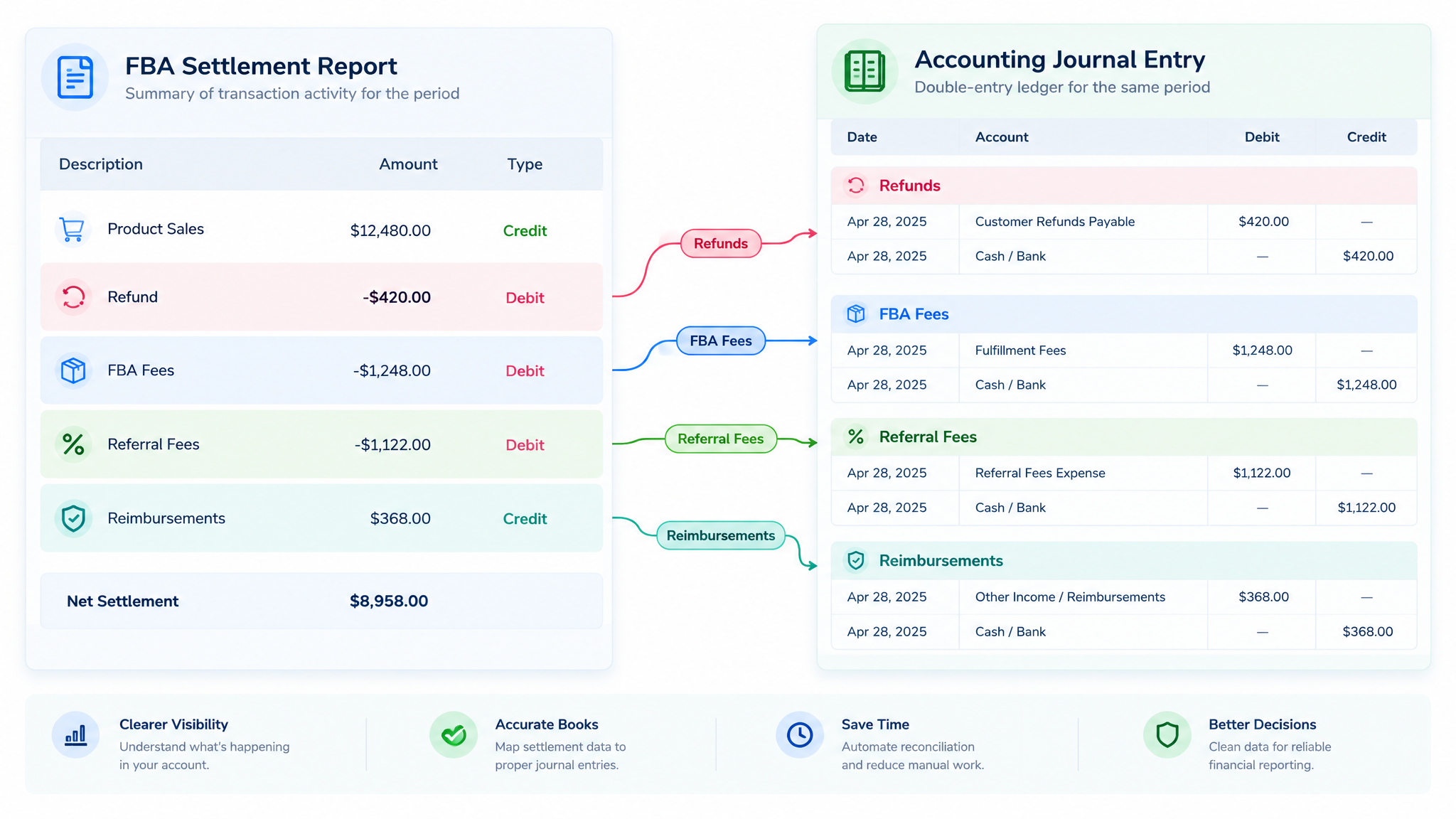
If you sell on Amazon in the US, your books are not a simple list of sales. Every Amazon settlement bundles referral fees, FBA fulfillment fees, storage charges, advertising spend, returns, reimbursements, and sales tax collected by Amazon. The best accounting software for Amazon FBA sellers is the one that turns those settlement files into accurate profit, inventory, and tax records without a weekend of spreadsheet surgery.
This guide is written for US sellers at different stages: new sellers choosing a first bookkeeping tool, growing sellers adding sales tax automation, operations managers who need SKU-level profit visibility, and brand owners preparing for lending, audits, or acquisition conversations. If you are still building your broader toolkit, start with our guide to the best Amazon seller tools, then come back here to choose the accounting layer.
Why Amazon FBA Accounting Is Different
Amazon FBA looks simple from the outside: you send inventory, Amazon ships it, and money arrives. Inside Seller Central, every disbursement is a bundle of activity that has to be unpacked before you can trust your profit and loss statement. Generic small-business bookkeeping was not built for this flow, which is why so many sellers end up with a ledger that looks clean but tells them nothing useful about SKU performance.
- Settlement-level revenue: Amazon does not pay you order by order. It groups sales, fees, refunds, reimbursements, and tax into settlement periods. Your accounting should import the settlement, not just the order report.
- Fee-level mapping: Referral fees, FBA fulfillment fees, monthly storage, long-term storage, removal, disposal, advertising, coupons, and subscription charges should land in separate accounts. One broad Amazon fees account hides the leaks.
- Inventory that moves: Units are inbound, available, reserved, returned, removed, disposed, or reimbursed. COGS and inventory value need to follow those movements, not just the units sold.
- Sales tax is not one thing: Amazon may collect and remit sales tax as a marketplace facilitator in many US states, but sellers can still have obligations for their own website, wholesale channels, registrations, and filings. Income tax is a separate matter entirely.
- Cash timing and reserves: Amazon disbursements lag sales, reserves may be held, and reimbursements can arrive weeks later. A cash-basis spreadsheet often makes a profitable month look like a cash crisis.
If your books show one big Amazon deposit and one big Amazon fee, you can run a business, but you cannot manage one. You cannot see which SKU funds your ads, which category is losing money after returns, or how much cash should be set aside for sales tax and income tax. That is the gap FBA-specific accounting software is designed to close.
How We Evaluated the Best FBA Accounting Software
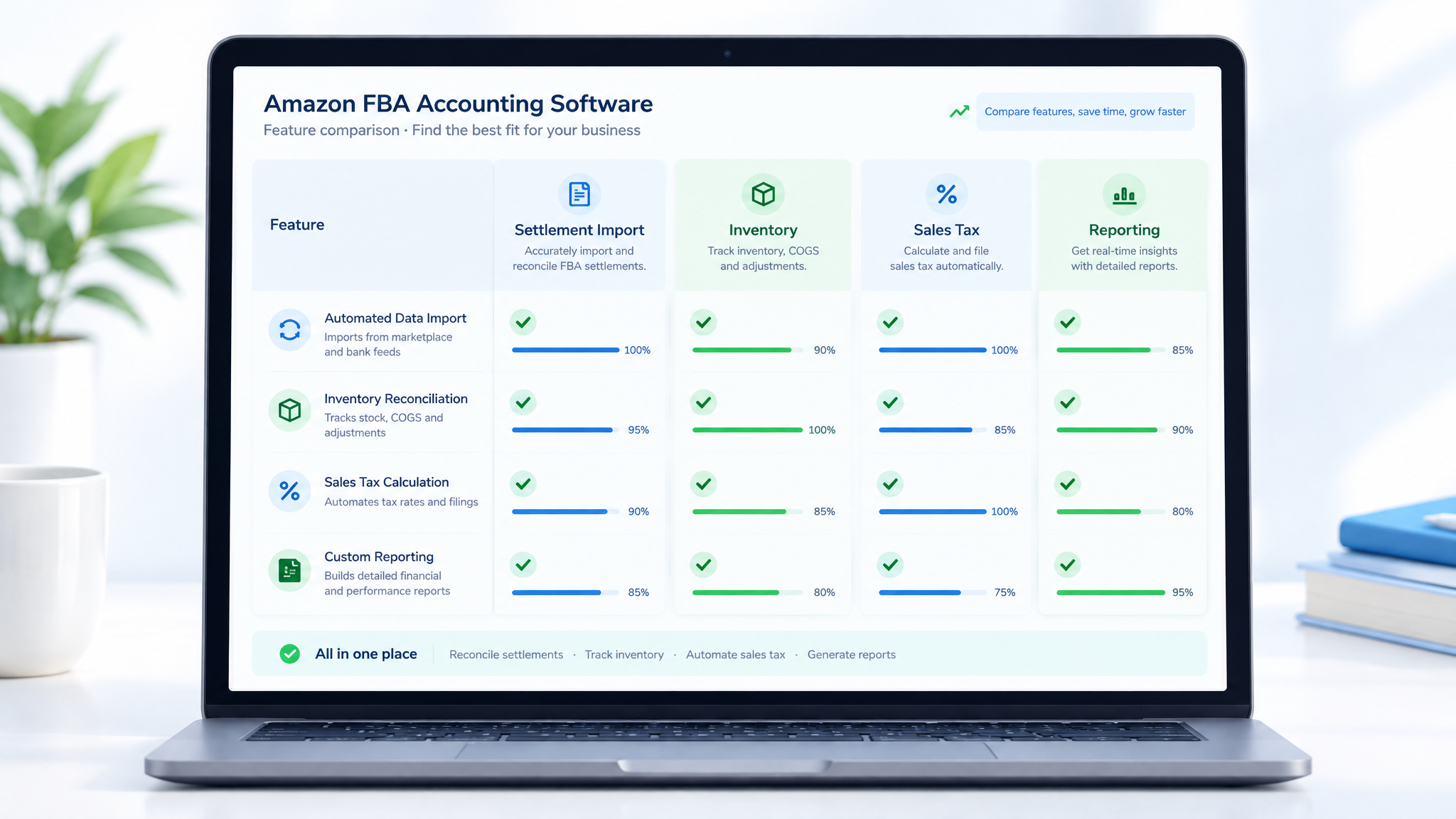
There is no objective winner for every Amazon seller because the right stack depends on channel mix, inventory complexity, entity structure, tax registrations, and who keeps the books. We evaluated tools against the workflows that matter most to US FBA sellers, then grouped them by fit rather than pretending a single product is best for a first-year seller and a multi-entity brand.
- Settlement import: Does the tool ingest Amazon settlement reports and break out fees, refunds, reimbursements, and tax?
- Fee mapping: Can you map Amazon fee types to separate general ledger accounts for better reporting?
- Inventory and COGS: Does it support landed cost, inbound freight, duties, prep costs, returns, and inventory reconciliation?
- Sales tax: Does it calculate, track nexus, file returns, or integrate with a specialist tax engine?
- Multi-channel fit: Can it handle Amazon plus Shopify, Walmart, eBay, TikTok Shop, or wholesale without duplicate work?
- Reporting: Can you see SKU-level, channel-level, and period-level profit and loss without exporting to a spreadsheet?
- Audit trail: Are journal entries traceable, periods lockable, and reports exportable for a CPA or lender?
- Total cost and support: Are pricing, onboarding, and US accountant access clear before you commit?
We reviewed public feature documentation, common month-end close workflows, and the questions sellers ask before they switch systems. This is not a paid ranking, and no tool is endorsed as universally best. Features and prices change frequently, so verify current details with each vendor before you buy. The goal is to help you ask better questions, run a controlled trial, and avoid paying for automation you will not use.
Top Accounting Software for Amazon FBA at a Glance
Use this table to build a shortlist, not to make a final decision. The strongest choice is usually a stack: a general ledger for double-entry books, a connector for Amazon settlements, and a tax tool or advisor for filings.
| Tool or stack | Best fit | FBA strength | Watch-outs |
|---|---|---|---|
| QuickBooks Online + A2X | Established US sellers with a CPA or bookkeeper | Settlement journal entries, fee mapping, accrual reports | Needs a connector; QBO inventory is basic |
| Xero + A2X | Growing and multi-currency sellers | Clean ledger, app ecosystem, settlement automation | Check US accountant familiarity and payroll fit |
| Synder | Multi-channel sellers | Amazon, Shopify, Walmart and other channel syncs | Connector, not a full advisory service |
| A2X | Amazon-first automation | Precise settlement mapping and tax mapping | Requires a separate ledger and setup time |
| TaxJar, a Stripe company | Sales tax filing | Nexus tracking, calculations, return prep | Not bookkeeping or income tax prep |
| Sellerboard | Profit visibility for operators | SKU-level profit and loss, alerts, reimbursement checks | Not a double-entry ledger |
| InventoryLab | Inventory-heavy sellers | Landed cost, batch tracking, profitability | Not a full tax or CPA replacement |
| Avalara | Enterprise tax operations | Registrations, returns, exemption certificates | Cost and implementation overhead |
A first-year seller with one Amazon account may only need a ledger, a connector, and a tax advisor. A brand selling across Amazon, Shopify, and wholesale may need a central ledger, a multi-channel connector, a sales tax engine, and a bookkeeper who understands inventory. The table is a starting point for those conversations.
The 8 Best Accounting Software Options for Amazon FBA
The shortlist below mixes full ledgers, specialist connectors, sales tax engines, and inventory profit tools. That is intentional: the best accounting software for Amazon FBA sellers is often a stack, not a single subscription. Choose the combination that matches your books, your tax exposure, and the reports you actually use.
1. QuickBooks Online + A2X
QuickBooks Online is the small-business ledger many US accountants already know, which makes it a practical choice if you plan to hire a bookkeeper or CPA. It handles bank feeds, accrual or cash reporting, sales tax setup, and the standard reports lenders and buyers expect. On its own, however, QuickBooks does not turn an Amazon settlement report into accurate journal entries.
A2X fills that gap by importing Amazon settlements and creating summary journal entries with fee-level detail, tax mapping, refunds, reimbursements, and cost of goods support. The result is a ledger that ties to Amazon disbursements instead of a pile of manual deposits. Setup takes discipline: map fee types, connect the right accounts, and reconcile each settlement against the bank deposit.
Best for: US sellers who want CPA-ready double-entry books and are willing to pay for a connector. Watch-outs: QuickBooks inventory is basic for FBA, so many sellers track landed cost in a separate inventory tool or spreadsheet. Confirm current QBO and A2X pricing, and budget time for initial mapping.
2. Xero + A2X
Xero is a strong alternative to QuickBooks for sellers who want a clean interface, solid bank reconciliation, and multi-currency support. Paired with A2X, it can produce the same settlement-level journal entries and fee breakdowns that make Amazon books usable. Growing sellers often prefer Xero when they operate in multiple marketplaces or work with an international bookkeeping team.
The trade-off is ecosystem fit. QuickBooks has deeper familiarity among many US small-business accountants, while Xero may require you to confirm that your CPA or bookkeeper is comfortable with it. Xero also has a different inventory and payroll footprint, so check the add-ons you need before switching.
Best for: growing sellers, international sellers, and teams that prefer Xero workflows. Watch-outs: confirm US sales tax and payroll add-on fit, and do not assume your accountant supports Xero just because the software is capable.
3. Synder
Synder is a multi-channel connector that syncs Amazon, Shopify, Walmart, eBay, Stripe, and other payment or sales platforms into a ledger. It is useful when Amazon is only one part of the business and you do not want a separate reconciliation process for every channel. The tool can break out fees, taxes, refunds, and payouts so the ledger reflects the economics of each channel.
Synder is not a replacement for a bookkeeper or a full advisory relationship, and its value depends on clean connections and sensible account mapping. It works best when you already have a ledger and a monthly close process, and you want to reduce manual imports. Review transaction volume pricing and test one month of data before committing.
Best for: sellers running Amazon plus other channels who want one sync layer. Watch-outs: connector capability is not the same as accounting judgment; you still need someone to review mappings and reconcile payouts.
4. A2X
A2X is one of the most focused Amazon accounting automation tools on the market. It is built around settlement reports, which is exactly the right unit of analysis for FBA. It can separate revenue, fees, refunds, reimbursements, sales tax, and cost of goods, then post summarized entries to QuickBooks, Xero, or another supported ledger.
Because A2X is a specialist tool, it is not a full accounting system by itself. You still need a ledger, a chart of accounts, and a human review process. The payoff is cleaner fee mapping and less manual work for sellers who have outgrown spreadsheets but do not want to build custom integrations.
Best for: Amazon-first sellers who already have a ledger and want precise settlement automation. Watch-outs: onboarding requires accounting knowledge, and pricing is usually tied to transaction volume. Verify current plan details and support for your marketplace mix.
5. TaxJar, a Stripe company
TaxJar is a sales tax tool, not a bookkeeping system. It helps sellers monitor economic nexus, calculate tax, and prepare or file returns across states. For Amazon FBA sellers, the key question is not whether Amazon collects tax on marketplace sales, but whether you have other taxable activity, registrations, or filing obligations that need a system.
A sales tax engine becomes more valuable when you sell on your own website, sell wholesale, or have multiple entities. It also helps when you need a repeatable filing calendar instead of a year-end scramble. Tax rules vary by state and change over time, so confirm your nexus position with a tax professional before registering or filing.
Best for: sellers with multi-state sales tax exposure or direct-to-consumer channels. Watch-outs: it does not replace bookkeeping, income tax prep, or professional advice. Check current pricing and whether it supports the states and channels you actually use.
6. Sellerboard
Sellerboard is a profit analytics tool built for Amazon sellers. It pulls Amazon data into dashboards that show SKU-level profit, advertising impact, refunds, reimbursements, and inventory trends. For operators, that daily visibility can be more useful than a monthly accounting report because it highlights fee errors and unprofitable products before they compound.
Sellerboard is not a double-entry accounting system and should not be your only source for tax filing. It is best used alongside a ledger such as QuickBooks or Xero. The tool helps you ask better questions: which SKU is subsidizing the rest, where are reimbursements missing, and how much ad spend is really eroding contribution margin.
Best for: sellers who need fast profit visibility and operational alerts. Watch-outs: accounting-grade inventory and tax reporting may still require a separate ledger or advisor. Verify plan limits and data access before relying on it for month-end close.
7. InventoryLab
InventoryLab is designed around FBA inventory and profitability workflows. It helps sellers track landed cost, batch purchases, inbound shipments, and product-level profit. For private-label and inventory-heavy sellers, that operational detail is often the missing link between a bank statement and a real gross margin calculation.
It is not a full tax filing or CPA replacement, and it may not replace a general ledger for lenders or investors. The strongest use case is a seller who needs better control over inventory cost and buying decisions while using QuickBooks, Xero, or an accountant for the statutory books.
Best for: private-label and inventory-heavy sellers who need landed cost and batch visibility. Watch-outs: confirm how it exports data to your ledger and whether your bookkeeper will accept its reports.
8. Avalara
Avalara is an enterprise-grade sales tax and compliance platform. It can handle registrations, calculations, returns, exemption certificates, and complex product taxability rules. For a small single-channel seller, it is usually more than necessary. For a brand with multiple entities, wholesale customers, or a large state footprint, it can replace a fragile manual process.
Implementation and cost are the main considerations. Enterprise tax software only pays off when the filing volume and risk justify it. If you are evaluating Avalara, involve your CPA or tax advisor early and map your actual obligations before signing a contract.
Best for: established brands with complex nexus, wholesale, or multi-entity tax needs. Watch-outs: implementation overhead and pricing can be significant; do not buy enterprise tax automation to solve a bookkeeping problem.
If you prefer a done-for-you option, look for a bookkeeper or CPA who specializes in Amazon sellers and works in your chosen ledger. Ask how they handle settlement imports, inventory, reimbursements, sales tax, and year-end inventory counts. A specialist with a modest tool stack usually beats a generalist with expensive software and no FBA workflow.
FBA Bookkeeping Software Checklist: 12 Features That Matter
Use this checklist during a trial. A feature list on a pricing page is not proof that the workflow will survive a real Amazon month-end close. Test with actual settlement data, refunds, reimbursements, and at least one inventory adjustment.
- Settlement imports: The tool should ingest Amazon settlement reports, not just order-level sales. Settlement-level accounting is the only reliable way to tie revenue to disbursements.
- Fee-level mapping: You need separate accounts for referral fees, fulfillment fees, storage, advertising, returns, and other charges. This is how you find margin leaks and answer questions from your accountant.
- Landed cost and COGS: The system should support product cost plus freight, duties, prep center fees, inbound shipping, and other costs needed to calculate true gross margin.
- Inventory reconciliation: It should help you reconcile units sold, returned, removed, disposed, and reimbursed. Inventory is a balance sheet item, not just an expense.
- Returns and reimbursements: FBA reimbursements and chargebacks are easy to miss. The workflow should make them visible and traceable instead of letting them disappear into a generic adjustment account.
- Sales tax support: At minimum, the tool should integrate with a sales tax engine or produce reports your tax advisor can use. Do not assume Amazon handles every filing obligation.
- Multi-channel support: If you sell on Shopify, Walmart, or wholesale, confirm that the tool can handle those channels without manual re-keying or duplicate revenue.
- Bank and credit card reconciliation: Amazon disbursements are only one side of the story. You still need clean bank feeds, credit card coding, and owner draws or distributions.
- Accrual and cash reporting: You may need both views. Accrual accounting matches revenue and costs to the period; cash reporting shows what actually hit the bank.
- SKU and channel profitability: You should be able to see contribution margin by SKU, parent, marketplace, and period. If every report requires a spreadsheet rebuild, the tool is not saving enough time.
- Audit trail and locked periods: Journal entries should be traceable, changes should be logged, and closed periods should be lockable. This matters for lenders, buyers, and tax professionals.
- US accountant access and data export: Your CPA or bookkeeper should be able to review the books without fighting the software. Confirm user permissions, export formats, and support response times.
A tool can be excellent at one or two of these items and weak at others. That is why the stack approach works: a ledger handles double-entry books, a connector handles settlements, and a specialist handles tax or inventory. The important thing is that the handoffs are documented and reconciled.
Costs, Cost Tracking, and Tax Filing for US Sellers
Most FBA accounting problems are not caused by a missing feature. They are caused by unclear cost tracking, a tax filing scramble, and a software stack that was never designed to work together. Treat cost, bookkeeping, and tax as one operating system rather than three separate chores.
What the software stack typically costs
Vendors price in different ways: per company, per transaction volume, per state, per return, or per advisory hour. That makes a single monthly price misleading. Build a budget across four layers, then request current quotes from each vendor.
| Layer | What it covers | Budget note |
|---|---|---|
| General ledger | QuickBooks Online, Xero, or a comparable system | Monthly per-company plan; verify user and reporting limits |
| Settlement connector | A2X, Synder, or a similar Amazon integration | Often priced by transaction volume or channel count |
| Sales tax | TaxJar, Avalara, or a tax advisor | Monthly platform fee plus per-return or per-state costs |
| Full service | Bookkeeper, CPA, or fractional CFO | Quoted by volume, complexity, and tax filing scope |
For planning only, many US sellers fall into one of these illustrative bands: a simple spreadsheet plus tax filing setup can cost very little in software but consumes owner time; a core ledger plus settlement connector often lands in the low-to-mid hundreds of dollars per month; adding multi-state sales tax automation can push the total higher; full-service bookkeeping and tax prep is usually quoted separately and can reach four figures per month for complex brands. These are not vendor quotes. Confirm current pricing and scope before you commit.
Do not choose on sticker price alone. A cheaper tool that requires ten hours of manual work each month is expensive. A premium tool you do not configure correctly is also expensive. The best value comes from matching the stack to your transaction volume, filing footprint, and the hourly cost of the person doing the work.
Cost tracking: build five layers into your chart of accounts
Your chart of accounts should tell the story of how a product becomes profit. At minimum, track these five layers separately so you can see contribution margin before overhead and tax.
- Landed product cost: unit cost, inbound freight, duties, inspection, prep center fees, labeling, and any other cost required to get inventory into Amazon.
- Amazon fees: referral fees, FBA fulfillment fees, storage, removal, disposal, subscription, coupons, deals, and other seller charges. Separate them so you can compare fee trends over time.
- Advertising and promotions: sponsored products, sponsored brands, sponsored display, coupons, discounts, and external traffic. Ad spend can turn a healthy gross margin into a thin contribution margin.
- Operations and returns: software subscriptions, tools, customer service, chargebacks, return shipping, damaged inventory, and refunds that Amazon does not fully reimburse.
- Tax reserve: a separate cash or equity reserve for sales tax and income tax. Do not treat tax collected or tax owed as spendable operating cash.
Here is an illustrative unit economics example. Assume a $30 selling price, $8 landed cost, a 15% referral fee, a $5 FBA fulfillment fee, $1 in storage and prep, $3 in advertising, and a $1 returns reserve. That leaves $7.50 of contribution before overhead and income tax. Actual fees vary by category, size tier, and program, so use your own settlement data rather than copying a generic formula.
Tax filing: separate sales tax from income tax
Sales tax and income tax are different workstreams with different rules. On the sales tax side, marketplace facilitator laws mean Amazon often collects and remits tax on marketplace sales in many states. That does not automatically eliminate your registration, filing, or recordkeeping obligations, especially if you sell on your own website, sell wholesale, or have inventory stored in multiple states. Nexus rules and state guidance change, so confirm your position with a tax professional before registering or filing.
On the income tax side, clean bookkeeping is the foundation. You need accurate revenue, COGS, deductible expenses, inventory values, and owner or entity records. Estimated tax payments, 1099-K reporting, payroll, and state business filings all depend on the books being current. Do not wait until year-end to reconstruct twelve months of Amazon settlements. A monthly or quarterly close is cheaper than an emergency cleanup.
Keep settlement reports, expense receipts, inventory purchase records, and tax filings organized by period. If you need a practical starting point, review these Amazon seller tax-saving and accounting tips. This article is educational and is not tax or legal advice; use a qualified US tax professional for your specific situation.
How to Choose the Right Tool in 5 Steps
A disciplined selection process is more valuable than a list of features. Run these five steps before you sign an annual contract.
- Map your channels and entity structure. List every sales channel, bank account, credit card, marketplace, and legal entity. A tool that works for one Amazon account may fail when you add Shopify, Walmart, or a second LLC.
- Define the reports you actually need. Write down the five reports you want every month: profit and loss, balance sheet, cash flow, SKU profitability, and sales tax summary. If a tool cannot produce them without a spreadsheet rebuild, keep looking.
- Test one month of real settlements. Import actual Amazon settlement data, refunds, reimbursements, and at least one inventory adjustment. Reconcile the total to the bank deposit and compare the output to your current books.
- Check tax and inventory fit. Confirm how the tool handles sales tax nexus, filing exports, landed cost, returns, and inventory reconciliation. Ask your CPA or bookkeeper to review a sample report before you commit.
- Calculate total cost and exit cost. Add subscription fees, implementation time, accountant review, and the cost of switching later. Ask how you can export your data if you leave. The cheapest monthly plan can be the most expensive decision if the data is trapped.
A good trial should feel slightly uncomfortable because it forces you to document your process. That is a feature, not a bug. If the trial produces a clean reconciliation and a report your accountant can use, you are on the right track.
Common FBA Accounting Mistakes to Avoid
Most cleanup projects start with the same avoidable mistakes. Fixing them early saves far more than a software discount.
- Booking gross sales and one Amazon fee line. This hides fee changes, advertising waste, and refund patterns. Map fees separately from the start.
- Ignoring inventory in transit. Inventory that has left your supplier but not reached Amazon still has value and risk. Track it instead of expensing it immediately.
- Treating Amazon remittances as revenue. A disbursement is a cash movement, not necessarily the revenue for that period. Revenue should tie to settlement activity.
- Mixing personal and business spending. Use separate bank accounts and credit cards. Commingled funds make bookkeeping, tax prep, and lender reviews harder.
- Assuming Amazon handles every sales tax obligation. Marketplace facilitator rules are helpful, but they do not cover every channel, state, or entity situation. Confirm your nexus and filing duties.
- Waiting until year-end to reconcile. A twelve-month cleanup is expensive and error-prone. Close monthly or at least quarterly.
- Buying software before defining the process. Tools do not fix a missing chart of accounts, unclear inventory costing, or an unmapped sales tax footprint.
- Skipping the tax reserve. Profitable sellers can still run out of cash when tax bills arrive. Move a percentage of profit into a reserve on a regular schedule.
The common thread is visibility. If you cannot explain where a dollar went, the accounting stack is not doing its job. Fix the process first, then let software enforce it.
Mini Case Study: Cleaning Up a Multi-Channel FBA Business
This is a composite scenario based on common seller situations, not a client testimonial. A US private-label seller with about 40 active SKUs sold on Amazon and its own Shopify store. The owner kept books in a spreadsheet, exported Amazon sales reports once a month, and booked one combined Amazon fee. The business looked profitable overall, but the owner could not explain why cash was tight or which products deserved more inventory investment.
The cleanup started with a chart of accounts rebuilt around landed cost, Amazon fees, advertising, returns, and tax reserve. The seller moved the ledger to QuickBooks Online, connected A2X for Amazon settlements, and used a sales tax tool to organize registrations and filing calendars. InventoryLab was added for landed cost and batch visibility. The Shopify store was connected to the same ledger so revenue was not double-counted.
The first month-end close was slow because every mapping had to be reviewed. The second month was faster. By the third close, the owner could see contribution margin by SKU, spot a product that was losing money after advertising and returns, and identify reimbursements that had not been recorded. The business did not become profitable because of software, but the owner finally had the information to make better pricing, inventory, and ad spend decisions.
The lesson is simple: accounting software is a visibility system, not a magic tax fix. The seller still needed a bookkeeper, a tax advisor, and a monthly routine. The software made those relationships more productive because the data was finally traceable.
Bottom Line
The best accounting software for Amazon FBA sellers in the US is not the most expensive platform or the one with the longest feature list. It is the stack that connects Amazon settlements to double-entry books, tracks landed cost and inventory, and gives you a reliable path to sales tax and income tax filing. For many sellers, that means QuickBooks Online or Xero, a settlement connector such as A2X or Synder, and a tax advisor or sales tax tool when the filing footprint justifies it.
Start with clean data and a monthly close, then add automation where the manual work hurts most. A simple stack that is actually used every month will beat a sophisticated stack that is never configured. If you are scaling, invest in the accounting layer before the next inventory buy, not after the next tax bill.
FAQ
What is the best accounting software for Amazon FBA sellers in the US?
There is no single best option because the right stack depends on your channel mix, inventory complexity, tax registrations, and whether you have a bookkeeper. A common US setup is QuickBooks Online or Xero for the ledger, A2X or Synder for Amazon settlement automation, and a sales tax tool or tax advisor for filings. Sellerboard and InventoryLab are useful add-ons for profit visibility and inventory costing, but they do not replace a double-entry ledger. Shortlist two stacks, test one month of real settlements, and ask your CPA which reports they need.
How much does Amazon FBA accounting software cost per month?
Costs depend on transaction volume, the number of channels, how many states you file in, and whether you hire a bookkeeper. As an illustrative planning range, not a vendor quote, a simple ledger plus connector may land in the low-to-mid hundreds of dollars per month; multi-state sales tax automation can add a separate monthly or per-return cost; full-service bookkeeping and tax prep are usually quoted separately and can reach four figures per month for complex brands. Some sellers spend very little on software and more on professional time. Confirm current pricing directly with each vendor and include implementation time in your budget.
Does Amazon FBA accounting software handle sales tax and inventory reconciliation?
Some tools handle parts of both, but usually not in one product. Ledgers such as QuickBooks or Xero need a sales tax add-on or advisor for multi-state filings. Amazon connectors such as A2X or Synder map settlements and fees, while inventory tools such as InventoryLab help with landed cost and batch tracking. Sales tax and inventory reconciliation are separate workflows, so confirm exactly which system owns each one. A good rule is to test a month-end close with returns, reimbursements, and a sales tax report before you rely on any single tool.
Do I need QuickBooks for Amazon FBA?
You do not need QuickBooks specifically, but you do need a proper double-entry ledger if you want CPA-ready books, lender reporting, or a clean sale process. QuickBooks Online is common because many US accountants know it, but Xero is a credible alternative. What matters more than the brand is the connector and the process: settlement imports, fee mapping, inventory costing, bank reconciliation, and a monthly close. If you are very small, a spreadsheet plus a tax advisor can work for a while, but the risk of errors rises as SKU count and channels grow.
Can I use spreadsheets instead of FBA accounting software?
Yes, especially in the first few months or with a small, single-channel catalog. Spreadsheets are flexible and cheap, but they are easy to break, hard to audit, and time-consuming to reconcile when you have returns, reimbursements, multiple marketplaces, or sales tax filings. A safer middle ground is a basic ledger plus a settlement connector, with spreadsheets used only for planning or landed cost analysis. If you are preparing for a loan, investor conversation, or acquisition, move to a proper ledger before the due diligence request arrives.
Next Steps
A clean accounting stack is easier to build in one focused sprint than in a year of panic fixes. Here is a practical sequence:
- Export the last three Amazon settlement reports and list every fee, refund, reimbursement, and sales tax line. This becomes your mapping checklist.
- Shortlist two stacks, such as QuickBooks Online plus A2X and Xero plus A2X, then run a trial with one real month of data and a sample sales tax report.
- Set up landed cost, a tax reserve, and a monthly close calendar before you import a full year of transactions. Fixing the chart of accounts later is more expensive.
- Use SellerSprite to validate product economics before you reinvest in inventory. Create your SellerSprite account and connect product research to the numbers your accounting stack reports.
References
- Amazon Fulfillment by Amazon overview View
- Amazon Seller Central View
- IRS Publication 334, Tax Guide for Small Business View
- IRS Self-Employed Individuals Tax Center View
- QuickBooks Online View
- A2X Amazon accounting automation View
- TaxJar sales tax software View
- Sellerboard Amazon profit analytics View
- InventoryLab FBA inventory and profitability View
- Avalara sales tax and compliance View
By SellerSprite Content Expert
Amazon seller tools and marketplace SEO specialist.
Editorial process: AI-assisted draft prepared for human fact-checking, source verification, and brand review before publication.