TL;DR: Master the Amazon inventory turnover rate formula, benchmark your performance, and apply proven tactics to keep stock moving fast and boost profits.
Key Takeaways
- Calculate your turnover rate using the standard Amazon formula.
- Compare your ratio against industry benchmarks to spot inefficiencies.
- Implement data‑driven strategies: pricing, replenishment, and promotion, to raise turnover.
Table of Contents
Note on marketplaces: This guide is specifically optimized for the US market.
Understanding Amazon Inventory Turnover Rate
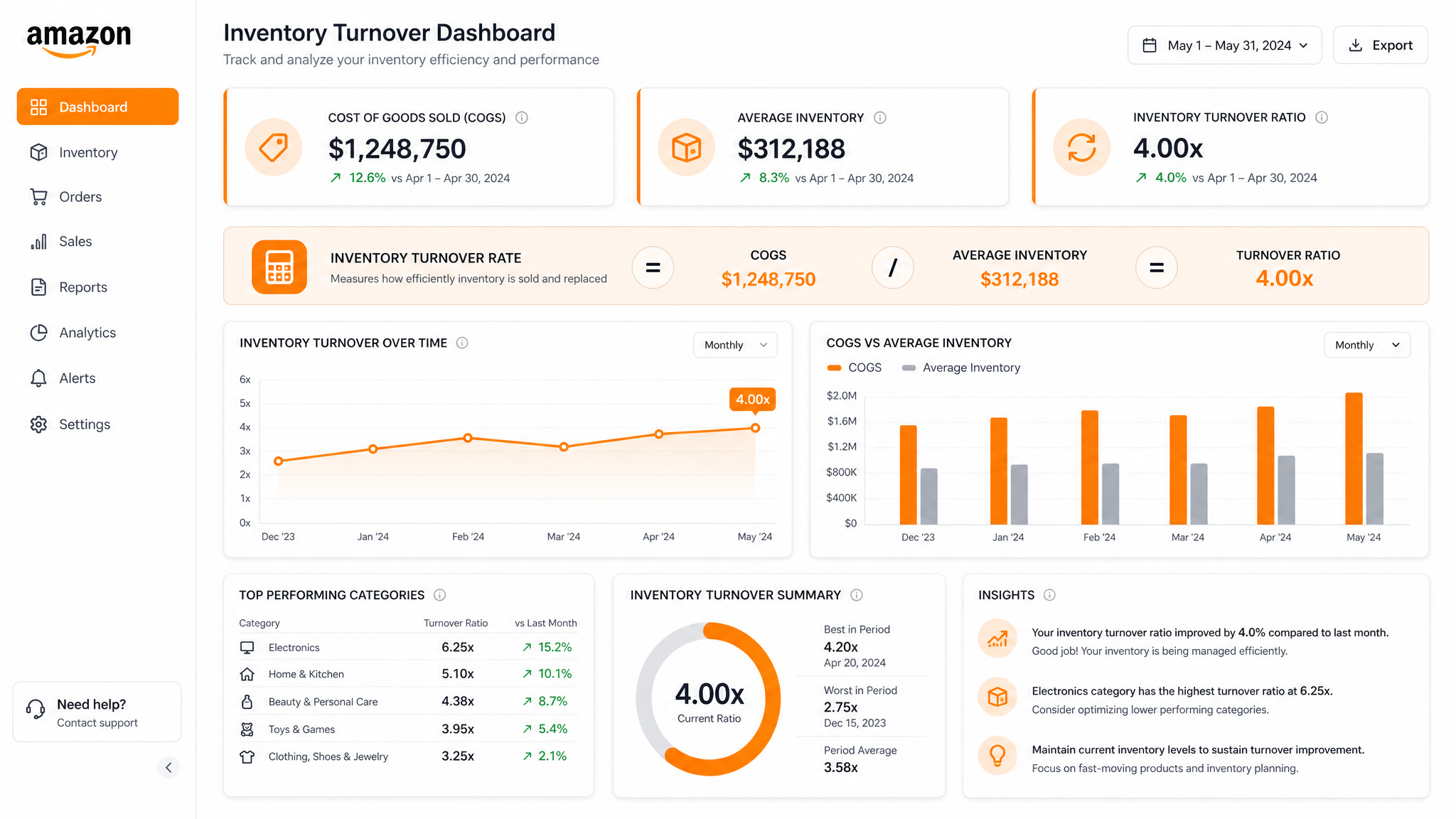
Inventory turnover rate measures how many times your stock is sold and replenished over a set period. For Amazon sellers, a high turnover indicates efficient stock management, lower storage fees, and better cash flow. The standard Amazon inventory turnover formula is: Turnover Rate = Cost of Goods Sold ÷ Average Inventory Value. Using this metric helps you spot deadstock, optimize reorder timing, and stay competitive in the ever‑changing marketplace. For a broader view of analytics, check out our Amazon Seller Analytics Guide.
Strategies to Improve Your Turnover Rate
Improving turnover is a mix of right‑pricing, demand forecasting, and inventory health. Below are proven tactics that work for growing sellers, brand owners, and even newcomers:
- Dynamic Pricing: Use repricing tools to stay competitive and avoid price‑driven slowdowns.
- Accurate Forecasting: Leverage Amazon's sales history and seasonality trends to order just enough stock.
- Bundle & Promotion: Create bundles or limited‑time discounts to move slower‑selling SKUs.
- Remove Unfulfillable Inventory: Regularly audit FBA inventory and liquidate or return deadstock to reduce average inventory value. See our guide on unfulfillable inventory for details.
- Optimize Shipping Costs: Choose the most cost‑effective FBA shipping options to keep COGS low. Learn more in Amazon FBA Shipping Options and Costs.
Benchmark your turnover against industry standards: the average Amazon FBA seller hits a turnover ratio between 4 × and 6 × annually, while top‑performing brands often exceed 8 ×. Use this insight to set realistic goals and track progress weekly.
Ready to put the formula into action? Sign up for SellerSprite and get automated alerts when your turnover dips below target.
FAQ
What is a good inventory turnover rate for Amazon sellers?
A healthy turnover ratio for most Amazon FBA sellers falls between 4× and 6× per year. Brands that manage inventory tightly and run fast‑moving products can reach 8× or higher. Anything below 3× may indicate excess stock, high storage fees, and cash‑flow risk.
How can I calculate my Amazon inventory turnover rate?
Use the formula: Turnover Rate = Cost of Goods Sold (COGS) ÷ Average Inventory Value. Pull COGS from your profit‑and‑loss report and calculate average inventory by adding the beginning and ending inventory values for the period, then dividing by two.
What strategies can increase inventory turnover on Amazon?
Key strategies include dynamic pricing, precise demand forecasting, bundling slow‑moving items, clearing unfulfillable inventory, and optimizing FBA shipping costs. Implementing these tactics reduces average inventory value and speeds up sales cycles.
Next Steps
- Create your SellerSprite account using the signup link above.
- Apply the inventory turnover formula to your Amazon data and set a benchmark target.
References
- Amazon FBA Shipping Options and Costs View
- Amazon Seller Fees and Unfulfillable Inventory View
- Amazon FBA vs Dropshipping View
- What is Amazon AWD? View
- Streamlining Your FBA Shipping and Fulfillment View
By SellerSprite Team
Our team combines years of Amazon marketplace expertise, data analytics, and e‑commerce strategy to help sellers of all sizes optimize inventory, reduce costs, and accelerate growth.