TL;DR: Learn how to detect viral product trends before they peak using Google Trends, social signals, and Amazon data; then validate and launch with low risk.
Key Takeaways
- Use Google Trends with correct filters to distinguish real trends from seasonal spikes or noise.
- Combine search, social, and Amazon commerce signals to validate viral potential early.
- Build a keyword ladder from breakout terms to long-tail opportunities for better SEO and PPC targeting.
- Always validate TikTok-viral products on Amazon before investing in inventory.
- Launch small, test fast, and scale only after confirming demand and profitability.
Table of Contents
- What "Viral" Really Means (And Why Most Sellers Arrive Too Late)
- The Trend Tracking Stack (Signals You Should Combine)
- Set Your "Viral Product Rules" (So You Don't Chase Noise)
- Step 1: Use Google Trends to Detect Early Momentum (Correct Setup Matters)
- Step 2: Find Breakout Keywords and Adjacent Niches (Where the Real Opportunity Hides)
- Step 3: Validate the Trend on Amazon (So You Don't Overtrust Google)
- Step 4: Use Social Virality Without Getting Trapped (TikTok → Amazon Bridge)
- Step 5: Timing the Market: When to Launch, When to Hold, When to Exit
- Step 6: Turn Trend Signals Into a Controlled Launch Plan (Low-Risk Testing)
- Common Mistakes in Viral Product Hunting (And How to Avoid Them)
- Mini Walkthrough: From Google Trends "Breakout" → Amazon Validation in 30 Minutes
- FAQ
- References
Note on marketplaces: This guide is specifically optimized for the US market.
What "Viral" Really Means (And Why Most Sellers Arrive Too Late)
Many Amazon sellers chase "viral" products only to find themselves stuck with unsold inventory. The problem? They confuse short-term spikes with sustainable demand. True virality isn't just popularity; it's momentum that can be captured profitably before the market saturates.
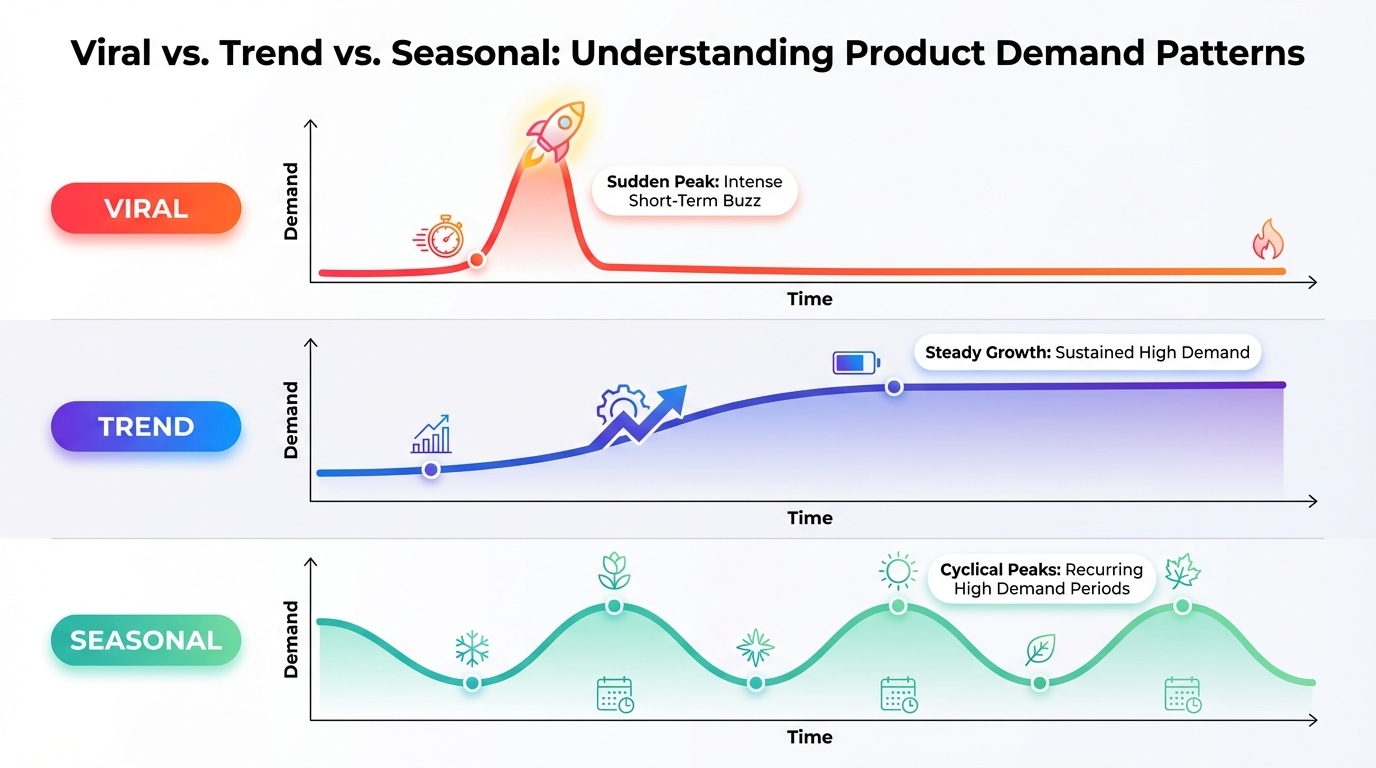
Viral ≠ sustainable demand (spike vs. trend vs. seasonality)
A viral spike is sudden and intense but fades quickly, like a TikTok dance challenge. A trend grows steadily over months and supports multiple product iterations. Seasonality repeats annually (e.g., Halloween costumes). Sellers who mistake spikes for trends often overbuy and underperform.
The 3 phases of a trend: emergence → acceleration → peak/decay
Every trend follows a lifecycle. In the emergence phase, search volume rises slowly and few competitors exist. During acceleration, media attention increases and more sellers enter. At peak/decay, competition explodes and margins collapse. The goal is to enter during emergence or early acceleration.
Where Amazon sellers win: early signal + fast validation + controlled risk
Winning sellers don't predict the future; they detect early signals, validate quickly, and act with discipline. By combining tools like Google Trends, TikTok, and Amazon BSR data, you can spot trends before they go mainstream and launch with minimal risk.
- Viral: Rapid, short-term spike in attention (e.g., TikTok trend).
- Breakout: Sudden surge in search volume indicating new interest.
- Seasonal: Predictable annual demand (e.g., Christmas lights).
- Evergreen: Consistent, long-term demand (e.g., phone chargers).
The Trend Tracking Stack (Signals You Should Combine)
Relying on a single data source leads to false positives. Top-performing Amazon sellers use a multi-signal approach, blending search, social, commerce, and supply chain insights to confirm trend viability.
Search signals: Google Trends + Amazon autocomplete
Google Trends reveals rising interest in product categories. Pair it with Amazon's search autocomplete to see what real buyers are typing. If "magnetic eyelashes" shows rising searches and autocomplete suggests "magnetic eyeliner kit," you've found a potential niche.
Social signals: TikTok/YouTube/Instagram (attention)
TikTok is a leading indicator of consumer behavior. Viral videos often precede search spikes. Try to identify trending hashtags and content formats. But remember: social buzz doesn't always convert to sales.
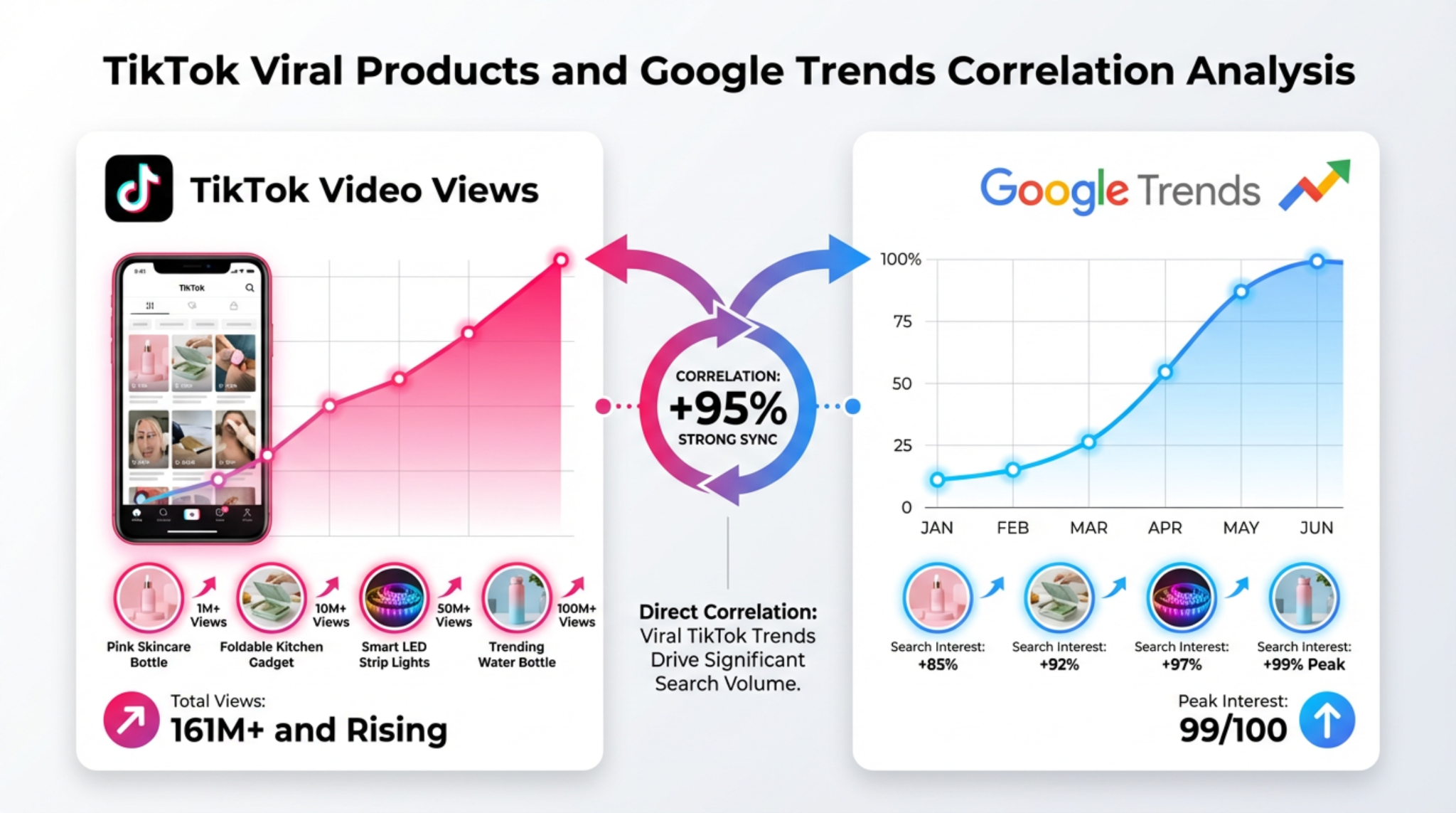
Commerce signals: Amazon rank/BSR movement + ad density
Check Best Seller Rank (BSR) trends using tools like SellerSprite Product Research. A rapidly improving BSR indicates growing sales. High ad density on search results means competition is heating up, so you'd better enter fast or wait for stabilization.
Supply signals: new entrants, copycats, and pricing compression
Monitor new ASINs in a category. A flood of similar listings signals trend confirmation, but also increased competition. Price drops among existing sellers indicate margin pressure. Use this as a warning to avoid late entry.
Set Your "Viral Product Rules" (So You Don't Chase Noise)
Without clear rules, trend hunting becomes gambling. Define your risk parameters, category limits, and success metrics upfront to avoid emotional decisions.
Define your risk budget (max spend, small-batch plan, exit rules)
Set a maximum test budget, e.g., $500 per trend. Use small-batch orders (e.g., 100-200 units) to validate demand. Establish exit rules: if CTR is below 0.3% or ACOS exceeds 45% after 7 days, pause and reassess.
Set your category constraints (compliance, size/weight, returns risk)
Avoid categories with high compliance risks (e.g., supplements, electronics). Prioritize lightweight, non-fragile items to reduce shipping costs and returns. Use past performance data to guide category selection.
Define what success looks like (time-to-launch, target margin, PPC feasibility)
Success isn't just sales; it's profitability. Set targets: e.g., 30% gross margin, break-even within 60 days, CPC under $0.80. If a trend doesn't meet these, skip it, even if it's "hot."
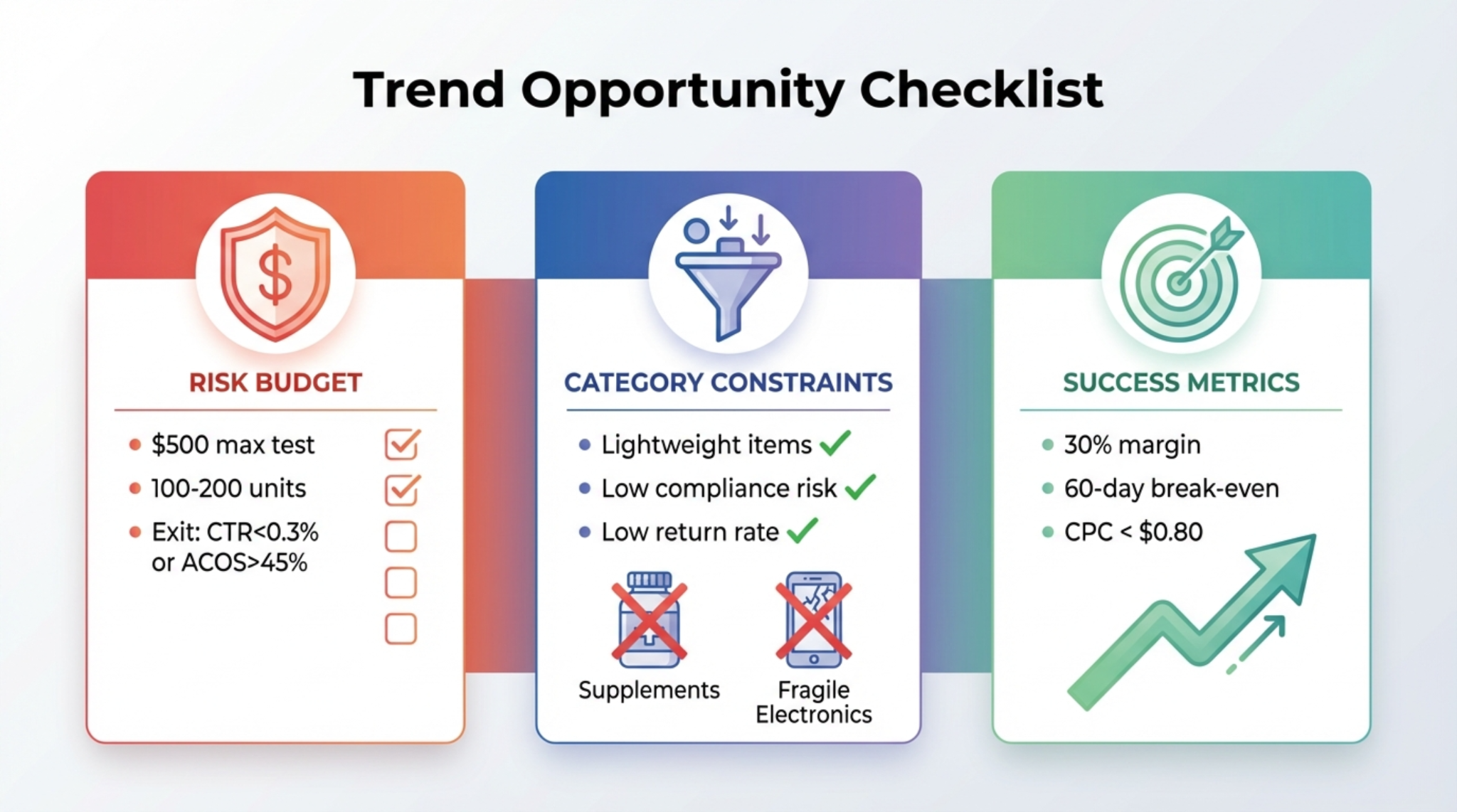
Trend Opportunity Checklist
- ✅ Rising Google Trends (past 5 years, no seasonality)
- ✅ Breakout keyword identified
- ✅ Amazon autocomplete relevance
- ✅ BSR improving for top products
- ✅ Low-to-moderate ad density
- ✅ No major compliance risks
- ✅ Small-batch order feasible
- ✅ Target margin ≥ 30%
Step 1: Use Google Trends to Detect Early Momentum (Correct Setup Matters)
Google Trends is the most accessible tool for spotting emerging demand, but only if used correctly. Misconfigured settings lead to false signals.
Choose the right settings: location, time range, category
Use "Past 5 years" to separate seasonality from true novelty
Set the time range to "Past 5 years" to identify whether a spike is new or part of a recurring pattern. If the trend appears every December, it's seasonal, not viral.
Use category filters to reduce irrelevant spikes
Filter by category (e.g., "Beauty and Fashion") to avoid noise from unrelated industries. A spike in "fitness trackers" under "Pets" is meaningless.
Topic vs. Search Term: when each is better
Topic = concept-level momentum; Search term = exact phrasing for keywords
Use "Topic" to explore broad interest (e.g., "reusable straws"). Use "Search term" to analyze specific phrases (e.g., "metal straws with cleaning brush") for keyword targeting.
What "Interest over time" patterns mean for sellers
Stair-step growth (early trend)
Gradual, step-like increases suggest organic growth, which is ideal for early entry.
Sharp spike + fast drop (viral moment)
Short-lived popularity only worth chasing if you can ship in under 2 weeks.
Repeating peaks (seasonality)
Plan annual launches, not one-time bets.
- Stair-step growth? → Investigate further, validate on Amazon
- Sharp spike + drop? → Only act if lead time < 2 weeks
- Repeating peaks? → Schedule for next cycle, don't rush
- No clear pattern? → Skip or monitor
Step 2: Find Breakout Keywords and Adjacent Niches (Where the Real Opportunity Hides)
The real gold in Google Trends isn't the main query; it's the breakout keywords and rising related topics that reveal unmet demand.
Use Related Queries / Related Topics (Top vs. Rising)
"Rising" = early discovery terms; "Top" = already mainstream terms
Focus on "Rising" queries: they show what's gaining traction. "Top" queries are competitive and often saturated.
How to interpret "Breakout" safely
Breakout as a signal to investigate, not a green light to buy inventory
A "Breakout" label means search volume grew over 5,000%. But it could be from a tiny base. Always cross-check with Amazon demand.
Build a "keyword ladder" from breakout → long-tail → core term
Start with the breakout phrase (e.g., "vegan leather crossbody bag"), then expand to long-tail variations (e.g., "small vegan leather bag for women"), and finally target the core term ("vegan handbag"). This ladder guides your SEO and PPC strategy.
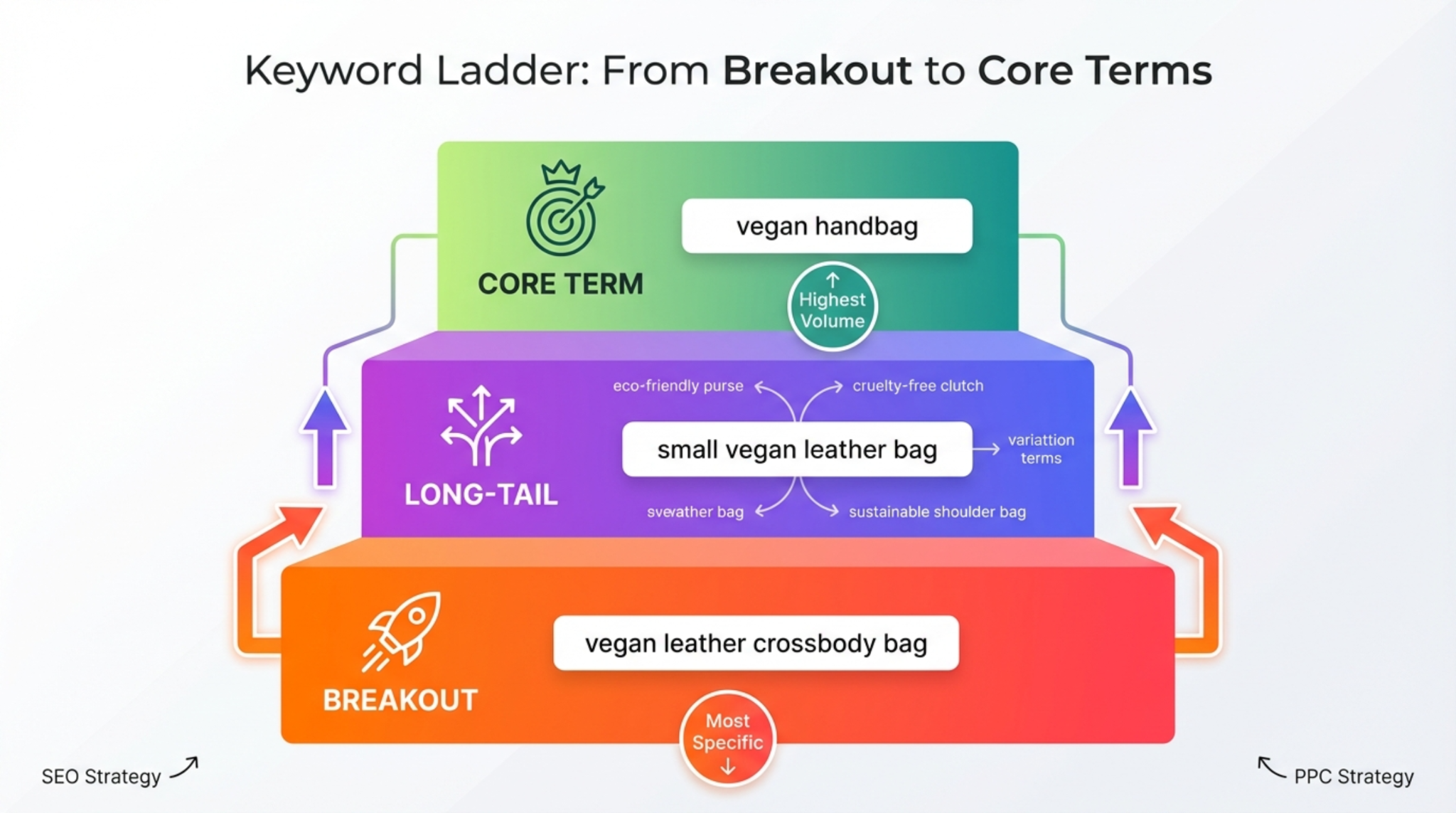
Breakout List + Keyword Ladder Example
- 🔍 Breakout: "collagen gummies for hair growth"
- 📌 Long-tail: "best collagen gummies for thinning hair women"
- 🎯 Core: "collagen supplements for hair"
Step 3: Validate the Trend on Amazon (So You Don't Overtrust Google)
Google Trends shows interest, but Amazon shows sales. Never skip validation.
Amazon-native checks: autocomplete + SERP relevance + category presence
Type your keyword into Amazon's search bar. If autocomplete suggests related terms, demand exists. Check if top results are relevant and in your target category.
Competition checks: review moat, brand dominance, ad density
If page one is flooded with sponsored placements, expect high CPCs
High ad density means aggressive competition. Use SellerSprite to analyze ad intensity and estimate entry costs.
Demand breadth: does the trend have multiple buyer-intent long-tails?
Look for variations like "buy," "best," "review," "near me." Multiple intent-based searches confirm real demand.
"Too late" signals: copycat flood + price collapse + saturated SERP
If 10+ new ASINs launched in the past month and prices are dropping, the window has closed.
Go / Watch / Skip Checklist
- 🟢 Go: Rising trend, low competition, clear buyer intent
- 🟡 Watch: Early signals, but unconfirmed demand or compliance risk
- 🔴 Skip: Saturated market, price war, or legal concerns
Step 4: Use Social Virality Without Getting Trapped (TikTok → Amazon Bridge)
TikTok can launch products overnight, but many go viral for novelty, not utility.
Translate social phrases into buyer keywords (what people actually search)
A TikTok video might say "this gadget changed my life," but buyers search "automatic vegetable chopper." Use social language to inspire, not dictate.
Confirm intent: social curiosity vs. purchase-ready queries
High views ≠ high sales. Check if commenters are asking "Where to buy?" or just laughing.
Watch for fake virality (giveaways, paid hype, bot-driven spikes)
Some creators use giveaways to inflate views. Look for organic engagement and sustained interest.
Extract product improvement ideas from comments (differentiation angles)
User feedback often reveals flaws, e.g., "wish it came in black." Use this to improve your version.
Step 5: Timing the Market: When to Launch, When to Hold, When to Exit
Perfect timing maximizes ROI. Too early = no demand. Too late = no margin.
The 3 best entry points
Early growth (best ROI, highest uncertainty)
High risk, high reward. Requires fast validation.
Acceleration (balanced risk/reward)
Demand is proven; competition rising. Optimize listing and PPC.
Post-peak leftovers (only if you have differentiation)
Enter only with better features, branding, or pricing.
Inventory timing rules (lead time vs. trend slope)
If lead time > trend window, don't chase it
A 60-day lead time won't work for a 30-day trend.
PPC timing strategy
Early: discovery + tight negatives
Test broad and auto campaigns with strict negatives.
Mid: scale exact winners
Focus on high-converting keywords.
Late: protect margin, avoid bidding wars
Shift to defensive bidding or exit.
Timing Playbook
| Phase | Action |
|---|---|
| Emergence | Validate, small test batch |
| Acceleration | Launch, scale PPC |
| Peak | Optimize, protect margin |
| Decay | Exit or reposition |
Step 6: Turn Trend Signals Into a Controlled Launch Plan (Low-Risk Testing)
Never go all-in on a trend. Test small, learn fast, then scale.
Minimum viable launch (small batch + simple listing)
Start with 100-200 units and a clean, keyword-optimized listing.
Test plan: keywords, creatives, price bands
7-14 day PPC discovery window with clear cut rules
Set KPIs: CTR > 0.4%, CVR > 10%, ACOS < 40%.
Upgrade path: "Fix / Improve / Add" based on early feedback
Improve images, tweak title, add variants.
Document lessons for the next trend cycle (build a repeatable system)
Create a playbook for future trend responses.
Common Mistakes in Viral Product Hunting (And How to Avoid Them)
Confusing seasonality with virality
Use 5-year data to avoid this trap.
Using Trends without category/location filters
Always filter to your target marketplace and relevant category.
Buying inventory before validating Amazon demand and SERP fit
Validate first, order later.
Entering after the copycat flood (margin death)
Monitor new ASINs and pricing trends.
Ignoring compliance/IP risks in rush launches
Check trademarks and safety standards.
Mini Walkthrough: From Google Trends "Breakout" → Amazon Validation in 30 Minutes
Find a breakout query + build a keyword ladder
Example: "posture corrector shirt" shows breakout in Google Trends.
Check Amazon SERP + competitor signals
Autocomplete confirms demand. Top products have 50-200 reviews. Moderate ad density.
Decide: test now / watchlist / skip
Go: early trend, manageable competition.
Create a small-batch and PPC test plan
Order 150 units. Run auto and broad campaigns for 10 days.
FAQ
How can Amazon sellers identify viral products before they peak?
Use Google Trends to detect rising interest, validate with Amazon search and BSR data, and monitor social platforms like TikTok for early buzz. Combine these signals to spot trends during the emergence phase.
What tools or strategies help in tracking trending products on Amazon?
Use Google Trends, SellerSprite Product Research, Amazon autocomplete, and TikTok analytics. Combine search, social, and commerce signals for comprehensive trend tracking.
Why is trend tracking important for staying competitive in the Amazon marketplace?
Trend tracking allows sellers to launch products with high demand and low competition, maximizing ROI and reducing risk. It helps avoid oversaturated markets and supports data-driven decision-making.
What time range should I use in Google Trends?
Use "Past 5 years" to distinguish between seasonal patterns and true emerging trends. For short-term validation, use "Past 90 days" to assess recent momentum.
How do I validate TikTok products for Amazon demand?
Search the product on Amazon and check autocomplete, BSR trends, and customer reviews. Look for buyer-intent keywords and avoid products with only novelty appeal or fake engagement.
Next Steps
- Start using SellerSprite Product Research to validate trends with real Amazon data.
- Sign up for a free trial at SellerSprite and start tracking trends today.
References
- Amazon Product Research Guide View
- Trend Research for Long-Term Amazon Product Opportunities View
- How to Use Google Trends for Amazon Keyword Research View
By SellerSprite Success Team
The SellerSprite Success Team combines hands-on Amazon selling experience with data science expertise. We help thousands of sellers, from beginners to enterprise brands, make smarter product decisions using real-time market intelligence and proven research frameworks.