TL;DR: A broken Amazon PPC campaign drains budget and hurts profitability. This 10-step PPC audit checklist helps sellers identify inefficiencies, fix targeting errors, optimize bids, and improve ROI—whether you're a beginner or managing a high-volume brand.
Key Takeaways
- Regular PPC audits prevent wasted ad spend and improve conversion rates on Amazon.
- Common issues include poor keyword targeting, incorrect match types, and unoptimized bids.
- Using automation tools like SellerSprite can streamline audits and boost campaign performance.
Table of Contents
Note on marketplaces: This guide is specifically optimized for the US market.
Why Audit Your Amazon PPC Campaigns?
Amazon's Pay-Per-Click (PPC) advertising platform is one of the most powerful tools for driving visibility and sales. But without regular oversight, even well-intentioned campaigns can spiral into budget sinks with low returns. A PPC audit is a systematic review of your advertising performance to identify inefficiencies, eliminate waste, and reallocate budget toward high-performing keywords and placements.
For new sellers, an audit helps avoid costly mistakes early. For growing brands and experienced operators, it ensures scalability and profitability as ad spend increases. According to industry benchmarks, brands that conduct weekly or bi-weekly PPC audits see up to 35% improvement in Advertising Cost of Sale (ACoS) within three months.
Audits aren't just about fixing what’s broken—they're about uncovering hidden opportunities. Maybe a keyword you paused six weeks ago is now converting at a lower cost. Or perhaps your automatic campaigns are generating valuable search term data you haven’t leveraged in manual campaigns. These insights only emerge through structured analysis.
Most Common Amazon PPC Mistakes
Before diving into the audit steps, it’s crucial to understand the typical pitfalls that sabotage Amazon ad performance. Recognizing these patterns will help you spot red flags faster during your review.
1. Overreliance on Automatic Campaigns
Many new sellers launch products using only automatic campaigns, assuming Amazon will “figure it out.” While automatic campaigns are great for gathering initial search term data, relying on them long-term leads to broad, inefficient targeting. You’ll end up bidding on irrelevant or low-converting queries, inflating your ACoS.
2. Poor Keyword Match Type Strategy
Using only broad match keywords without refining with phrase or exact match limits control over who sees your ads. Conversely, being too restrictive with exact matches too early can starve your campaign of data. The key is a layered approach: start broad, analyze search term reports, then build tightly controlled manual campaigns.
3. Ignoring Search Term Reports
One of the most underutilized tools in Amazon Advertising is the Search Term Report. This report shows exactly what customers typed into Amazon’s search bar before clicking your ad. Failing to review this data means missing opportunities to add converting keywords and block irrelevant ones. For example, if you sell organic dog treats but keep showing up for “cat food,” you’re wasting money.
4. Not Adjusting Bids Based on Performance
Static bidding—setting a bid and never changing it—is a recipe for inefficiency. High-performing keywords deserve higher bids to win more impressions, while poor performers should be paused or bid down. Dynamic bid strategies (like 'Down Only' or 'Fixed') should be aligned with campaign goals.
5. Neglecting Product Targeting and ASINs
Beyond keywords, Amazon allows product targeting—showing your ads on competitor listings or complementary products. Many sellers ignore this feature entirely or use it incorrectly. For instance, targeting irrelevant ASINs or categories dilutes performance. But when done right, product targeting can capture high-intent shoppers already considering similar items.
6. Launching Without a Clear Goal
Are you optimizing for sales volume, profitability, or brand awareness? Without a defined objective, your campaign structure and KPIs become misaligned. A campaign optimized purely for clicks may generate traffic but not conversions. Always tie your strategy to business goals.
10-Step PPC Audit Checklist to Fix Bad Campaigns
Now that you understand the common issues, let’s walk through a comprehensive 10-step audit process. This checklist applies to Sponsored Products, Sponsored Brands, and even Sponsored Display campaigns. Whether you manage one product or a hundred, these steps will help you reclaim control of your ad spend.
Step 1: Review Overall Account Health
Start at the top. Log in to your Amazon Seller Central account and navigate to the Advertising Console. Look at your overall metrics:
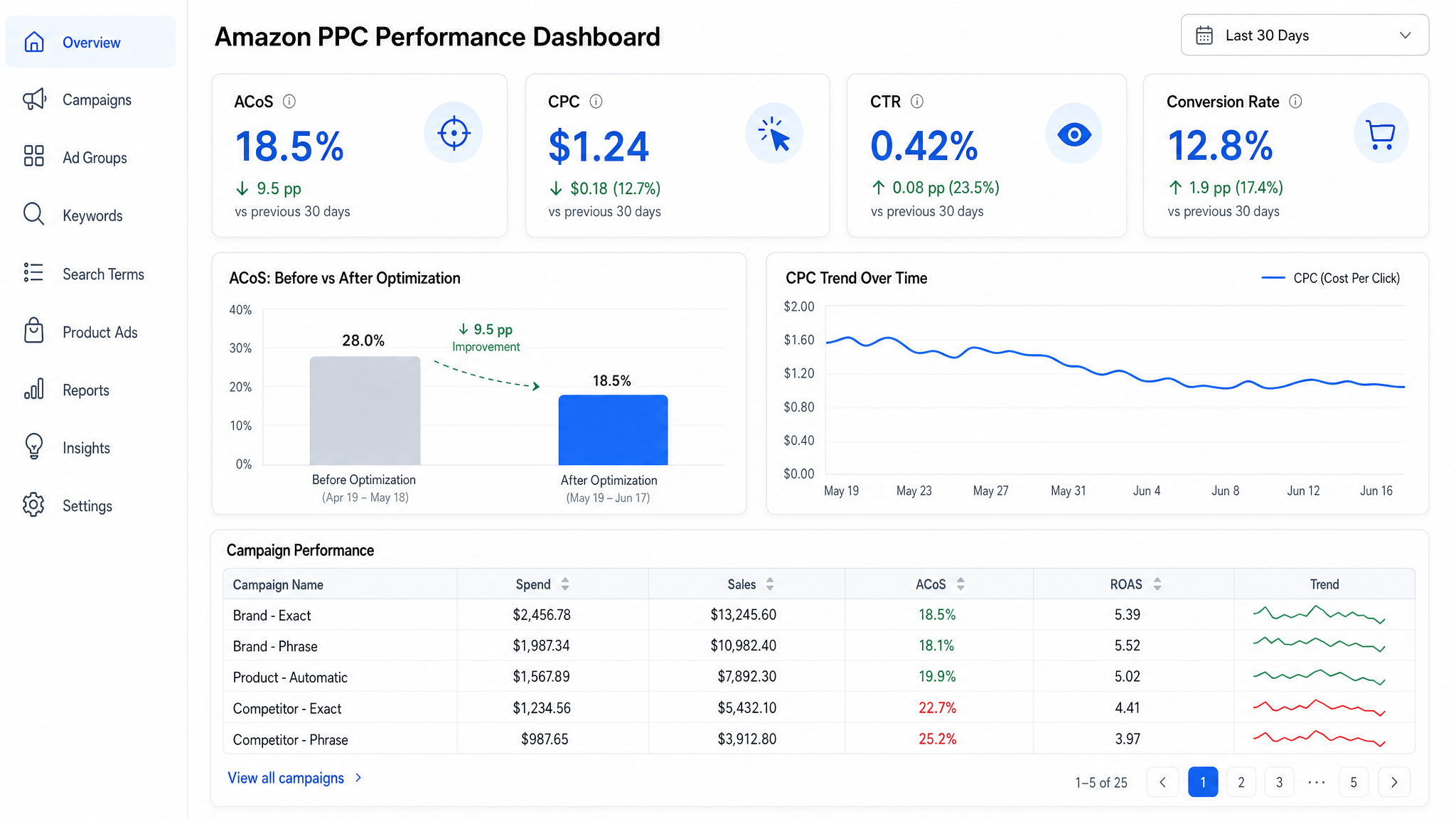
- ACoS (Advertising Cost of Sale): Is it above your target? For most products, 15–30% is healthy, but this depends on margins.
- TACoS (Total ACoS): Measures ad spend as a percentage of total revenue. Helps assess overall ad efficiency.
- Click-Through Rate (CTR): Below 0.4%? Your titles, images, or bids may be uncompetitive.
- Conversion Rate (CVR): Below 10%? Your listing quality or pricing may need work.
If any of these are off, drill down into individual campaigns. Use date ranges (last 7, 14, or 30 days) to spot trends.
Step 2: Audit Campaign Structure
A messy campaign structure makes optimization difficult. Best practices include:
- One product per ad group (for manual campaigns)
- Separate campaigns for automatic vs. manual
- Different match types in separate ad groups (broad, phrase, exact)
- Clear naming conventions (e.g., "Auto-ProductX-042024")
If you have campaigns with dozens of products or mixed match types, consider restructuring. While time-consuming, this pays off in precision targeting and easier bid management.
Step 3: Analyze Search Term Reports
Download your Search Term Report from the Advertising Console. Filter by campaign and date range. Look for:
- High-impression, low-click terms (optimize titles or bids)
- High-click, low-conversion terms (add as negative keywords)
- High-converting terms (add to manual campaigns)
For example, if “organic dog treats for small dogs” converts well, create a phrase match campaign around it. If “cheap puppy food bulk” gets clicks but no sales, add it as a negative exact keyword.
Step 4: Evaluate Keyword Performance
In your campaign manager, sort keywords by metrics:
- High ACoS keywords: Consider lowering bids or pausing.
- Low spend, high conversion: Increase bids to gain more visibility.
- Zero impressions: May need higher bids or better relevance.
Use the Amazon PPC Phrase & Broad Targeting Guide to refine match type strategies.
Step 5: Check Bid Strategies and Adjustments
Review your bid strategies. Are you using Dynamic Bids – Down Only for conversion-focused campaigns? Are top-performing keywords on fixed bids to maintain position? Also, check placement adjustments:
- Top of Search: Often worth a +50% bid adjustment
- Product Pages: Lower conversion potential; consider reducing bids
Avoid aggressive bid-ups unless you have strong conversion data.
Step 6: Review Negative Keywords
Negative keywords prevent your ads from showing for irrelevant searches. Audit your negative keyword list:
- Are you blocking misspellings or competitor brands?
- Are broad negatives too restrictive (e.g., blocking “free” might hurt gift-related searches)?
Use both negative exact and negative phrase match types strategically. For example, block “used” with negative exact to avoid second-hand shoppers.
Step 7: Assess Product Targeting Campaigns
If you’re running product targeting, review which ASINs or categories you’re targeting. Are they relevant? Are you bidding too high on low-converting placements? Use the placement report to see performance by detail page or category.
Also, consider running competitor ASIN targeting with value-based messaging (e.g., “Premium Alternative to [Brand]”). But ensure your product quality and price justify the claim.
Step 8: Optimize Ad Creative (Sponsored Brands)
For Sponsored Brands, your headline, logo, and custom image matter. Audit your ads for:
- Clear value proposition (e.g., “Veterinarian-Approved Ingredients”)
- Strong call-to-action (“Shop Now,” “Buy 2, Get 1 Free”)
- Mobile-friendly visuals
A/B test different creatives to see what resonates. Even small tweaks can lift CTR by 20% or more.
Step 9: Reassess Budget Allocation
Not all campaigns deserve equal budget. Shift funds from underperforming campaigns to winners. Use the 80/20 rule: 80% of your sales likely come from 20% of your campaigns.
Increase daily budgets on high-ROI campaigns to capture more market share. Pause or restructure campaigns with consistent negative ROI.
Step 10: Document Findings and Set a Schedule
After completing the audit, document your changes:
- What was fixed?
- What campaigns were paused or launched?
- What are the next steps?
Then, schedule your next audit. For most sellers, weekly audits are ideal. High-volume brands may benefit from daily monitoring. Use this Weekly PPC Optimization Guide to streamline the process.
Strategies to Improve Amazon PPC Performance
An audit isn’t the end—it’s the beginning of continuous optimization. Here are proven strategies to keep your campaigns performing:
Adopt a Launch-to-Growth Framework
New products need different strategies than mature ones. During launch, focus on visibility and data collection using automatic campaigns and broad match. As data accumulates, shift to manual campaigns with exact match and negative keywords. Learn more in our Amazon PPC Launch Strategy Guide.
Leverage Seasonal Trends
Adjust bids and budgets around holidays, back-to-school, or Prime Day. Increase bids on high-intent keywords like “gift for dog lover” in December. Use historical data to forecast demand.
Integrate PPC with Organic Ranking
PPC can boost organic rank by increasing sales velocity. Winning the buy box, getting reviews, and maintaining inventory all contribute. A well-optimized ad campaign doesn’t just drive paid sales—it fuels long-term organic growth.
Tools to Automate Your PPC Audit Process
Manual audits are time-consuming. For growing brands, automation is essential. Tools like SellerSprite offer features that streamline every step of the audit:
- Automated Search Term Mining: Identifies converting and wasteful search terms instantly.
- Smart Negative Keyword Suggestions: Recommends irrelevant terms to block.
- Bid Optimization Algorithms: Adjusts bids based on performance thresholds.
- Custom Alerts: Notifies you of ACoS spikes, budget exhaustion, or ranking drops.
By integrating with Amazon’s API, SellerSprite provides real-time insights and one-click optimizations, reducing audit time from hours to minutes. It’s especially valuable for Amazon PPC optimization at scale.
FAQ
What are the most common mistakes in Amazon PPC campaigns?
The most common mistakes include overreliance on automatic campaigns, poor keyword match type strategies, ignoring search term reports, not adjusting bids based on performance, and neglecting product targeting. Many sellers also fail to set clear campaign goals or conduct regular audits, leading to wasted ad spend and suboptimal ROI.
How often should I perform a PPC audit on my Amazon seller account?
Most sellers should perform a PPC audit at least once per week. New campaigns may require more frequent reviews (every 3–5 days) during the launch phase. High-volume brands or those running promotions should consider daily monitoring to catch issues early and capitalize on opportunities.
What tools can help me automate my Amazon PPC audit process?
Tools like SellerSprite, Helium 10, and Jungle Scout offer automation features for Amazon PPC audits. SellerSprite, in particular, provides automated search term analysis, smart bid adjustments, negative keyword suggestions, and performance alerts. These tools integrate with Amazon’s API to deliver real-time insights and one-click optimizations, saving hours of manual work.
Next Steps
- Download the SellerSprite free trial to automate your next PPC audit.
- Review your top 3 underperforming campaigns using the 10-step checklist above.
- Bookmark our Amazon PPC Optimization Hub for ongoing learning.
References
- Amazon Advertising Console Guide View
- Amazon PPC Launch Strategy View
- Weekly PPC Optimization in Campaign Manager View
- Amazon PPC Phrase & Broad ASIN Targeting Guide View
By SellerSprite Success Team
The SellerSprite Success Team combines hands-on Amazon advertising expertise with data science to help sellers optimize PPC, improve profitability, and scale efficiently. With years of experience across thousands of product launches and ad campaigns, we deliver actionable strategies rooted in real-world performance.