TL;DR: Use our free keyword mapping template to organize, prioritize, and strategically place high-converting keywords in your Amazon listings, boosting SEO, readability, and sales.
Key Takeaways
- Keyword mapping ensures every keyword has a purpose and placement in your Amazon listing.
- Our free downloadable template includes tabs for keyword clustering, listing placement, and performance tracking.
- Use a 3-tier system (Primary, Support, Long-tail) to prioritize keywords by relevance and intent.
- Place Tier 1 keywords in the title, Tier 2 in bullets, and Tier 3 in backend fields to avoid keyword stuffing.
- Regularly update your map using PPC data and ranking performance to maintain SEO edge.
Table of Contents
- What Keyword Mapping Is (And Why It Matters for Amazon SEO)
- Download the Keyword Mapping Template (Free)
- How the Template Works (The Keyword Priority System)
- Step-by-Step: Map Keywords to Your Amazon Listing
- Example: Completed Keyword Map (One Product, End-to-End)
- How to Maintain Your Keyword Map Over Time
- Common Keyword Mapping Mistakes (And How the Template Prevents Them)
- FAQ
- References
Note on marketplaces: This guide is specifically optimized for the US market.
What Keyword Mapping Is (And Why It Matters for Amazon SEO)
Keyword mapping is the strategic process of assigning specific search terms to defined sections of your Amazon listing, such as the title, bullet points, backend fields, and A+ content. It transforms raw keyword research into an organized, actionable plan that aligns with Amazon's A9 algorithm.
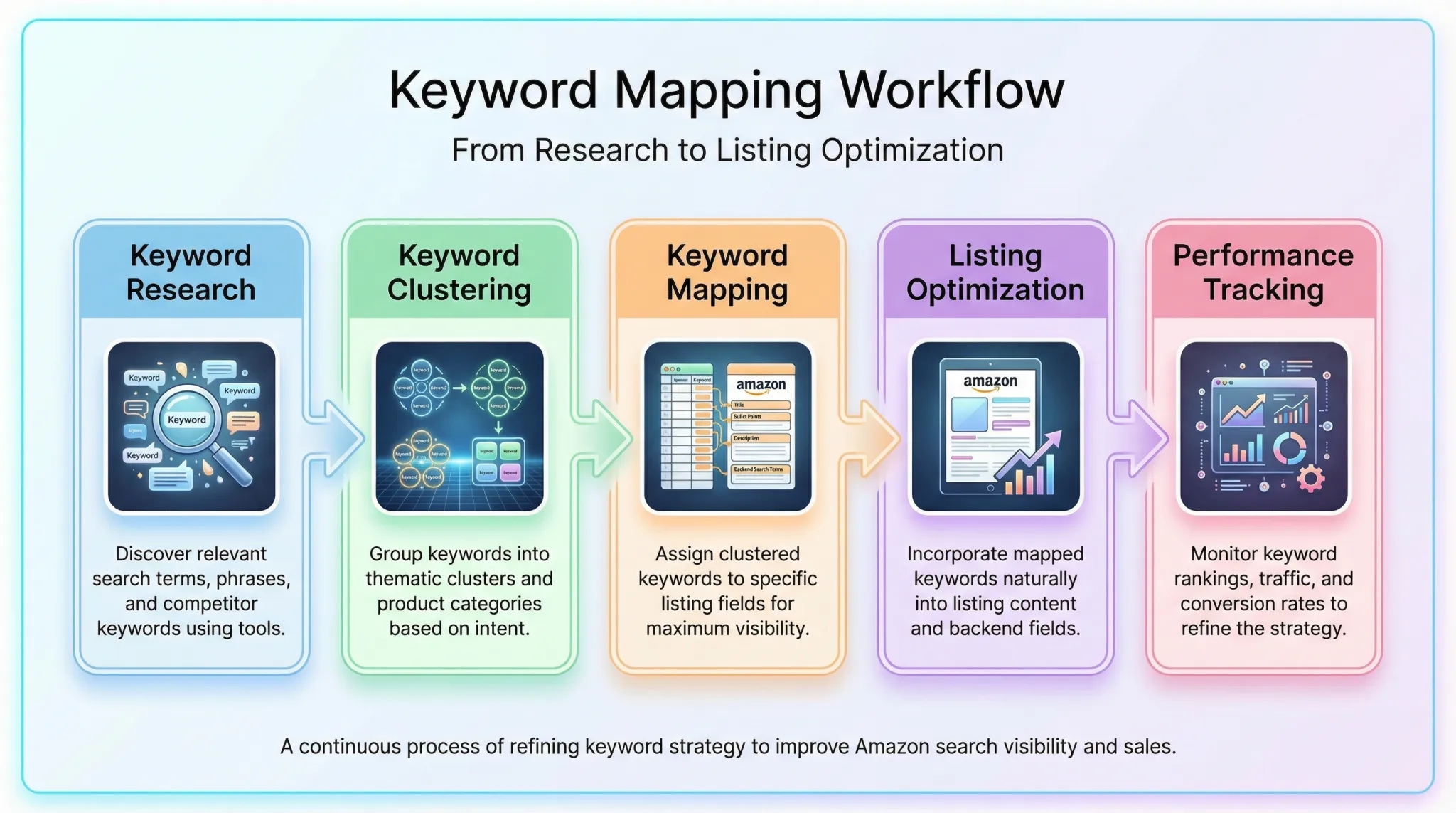
Keyword mapping = controlled keyword coverage (not keyword stuffing)
Many sellers dump keywords everywhere, such as title, bullets, backend, hoping something sticks. This hurts readability and can trigger Amazon's spam filters. Keyword mapping prevents this by ensuring each keyword appears only where it adds value, improving both SEO and conversion.
The "relevance → indexing → conversion" chain
Amazon rewards listings that clearly match buyer intent. When you map keywords intentionally, you signal relevance. This improves indexing for target terms, which drives visibility. Higher visibility + clear messaging = better conversion. It's a self-reinforcing cycle.
Common outcomes: better ranking stability + clearer listing readability
Sellers who use keyword mapping report more stable rankings and fewer fluctuations. Why? Because their listings are built on structured relevance, not keyword density. Plus, customers find the content easier to read and trust, leading to higher click-through and conversion rates.
Download the Keyword Mapping Template (Free)
We've created a free, ready-to-use Keyword Mapping Template for Amazon Listings in Google Sheets format. It's designed for Amazon sellers at all levels, from new FBA entrepreneurs to brand teams managing hundreds of SKUs.
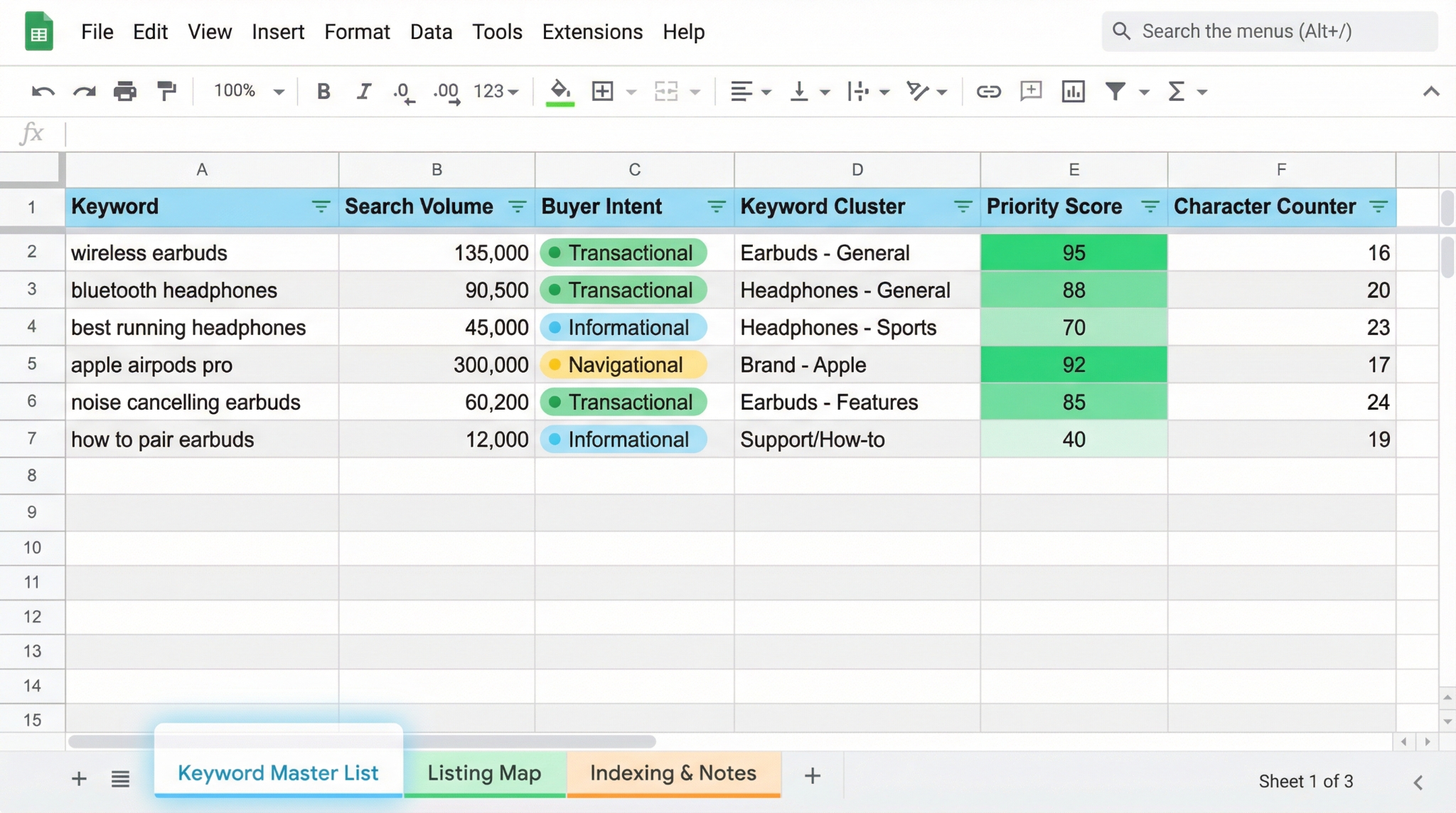
What you'll get (tabs + fields included)
Tab A: Keyword Master List (volume, intent, cluster, priority)
This tab holds all your raw keywords with columns for search volume, buyer intent (informational, navigational, transactional), keyword cluster, and priority score. Use filters to sort by opportunity or relevance.
Tab B: Listing Map (Title / Bullets / Backend / A+ notes)
Assign each keyword to a specific field. The template includes character counters for title and bullets to stay within Amazon limits. Backend field shows max 250-byte warning.
Tab C: Indexing & Notes (status, test dates, results)
Track when you launched the listing, updated keywords, and observed ranking changes. Add notes on conversion impact or PPC performance.
Template Summary
Our free Amazon keyword mapping template includes: (1) Keyword Master List with clustering, (2) Listing Map for title/bullets/backend, and (3) Indexing Tracker for performance monitoring. Works in Google Sheets or Excel.
Who this template is for (new launches vs. mature listings)
New sellers can use it to build high-converting listings from scratch. Growth-stage brands optimize existing listings. Enterprise teams standardize keyword strategy across product lines. Whether launching or refreshing, this template brings clarity.
How to use it in Google Sheets / Excel (quick setup steps)
1) Make a copy in Google Drive or download as Excel.
2) Rename the file with your product name.
3) Start populating the Keyword Master List.
4) Use filters to group by intent.
5) Begin mapping in Tab B. Share with team members for collaboration.
How the Template Works (The Keyword Priority System)
The template uses a proven 3-tier keyword model to help you prioritize and place keywords effectively. This system ensures you're not just adding keywords, but using them strategically.
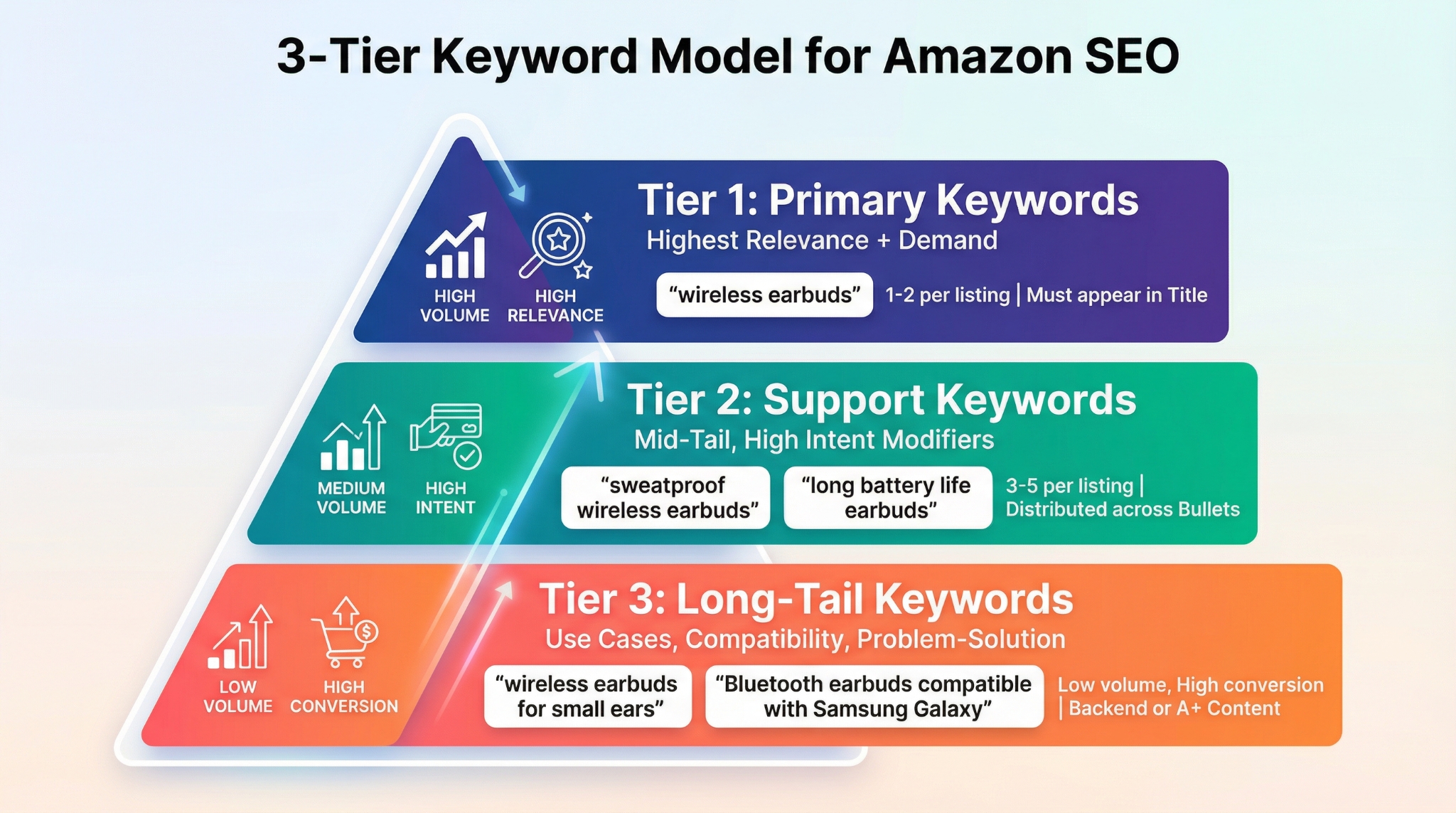
The 3-tier keyword model
Tier 1: Primary (highest relevance + demand)
These are your core search terms: high volume, high relevance, and directly tied to your product. Example: "wireless earbuds". Only 1-2 per listing. Must appear in the title.
Tier 2: Support (mid-tail, high-intent modifiers)
These add specificity and buyer intent. Examples: "sweatproof wireless earbuds", "long battery life earbuds". Use 3-5 per listing, distributed across bullets.
Tier 3: Long-tail (use cases, compatibility, problem-solution)
Low volume but high conversion. Examples: "wireless earbuds for small ears", "Bluetooth earbuds compatible with Samsung Galaxy". Place in backend or A+ content.
Keyword clusters: group by intent (not just synonyms)
Don't just group keywords by similarity. Group by buyer intent. For example, "sweatproof", "water-resistant", and "for gym" belong together because they serve fitness users. Clustering by intent improves messaging coherence.
A simple scoring method (copy/paste)
Use this formula in your spreadsheet to score keywords:
Score = Relevance (1-5) × Intent (1-5) × Opportunity (1-5)
Sort by score to identify top candidates for Tier 1 and 2 placement.
Step-by-Step: Map Keywords to Your Amazon Listing
Follow this 5-step process to turn raw keyword data into a high-performing Amazon listing.
Step 1: Build a clean keyword list (before mapping)
Pull sources: Amazon autocomplete, competitor listings, PPC search term report
Use SellerSprite's Keyword Mining to extract autocomplete suggestions, competitor keywords, and high-performing PPC terms. Combine all into one master list.
Deduplicate: singular/plural/synonyms without bloating the map
Remove exact duplicates. Group near-duplicates (e.g., "earbuds" and "ear buds") under one entry. Use the "Variants" column to track them without cluttering the map.
Step 2: Assign the Primary Keyword to the Title (Rules that keep it human)
Title formula: Core term + key attribute + key differentiator
Example: Wireless Earbuds, 50H Playtime, IPX7 Waterproof, Bluetooth 5.3 - for iPhone & Android. This includes the Tier 1 keyword, a key feature, and a differentiator.
Readability rules: don't stack 6 near-synonyms
Avoid "Wireless Earbuds, Bluetooth Earbuds, True Wireless, Noise Cancelling, ANC, Wireless Headphones". It reads like spam. Stick to one core term and enhance with benefits.
Step 3: Distribute Support Keywords across the 5 Bullets
Bullet mapping rule: 1 bullet = 1 intent theme
Each bullet should focus on a single buyer concern. Example: one bullet for battery life, another for comfort, another for compatibility.
Best bullet themes: use case, compatibility, material/size, problem-solution, trust/proof
Use proven themes like "Perfect for workouts and running" (use case) or "Compatible with all Bluetooth devices" (compatibility) to naturally include Tier 2 keywords.
Step 4: Put remaining variants into Backend Search Terms (Safely)
What belongs in backend: spelling variants, synonyms, long-tail leftovers
Include terms like "earphones", "wireless headphones", or "Bluetooth earbuds for iPhone 14" that didn't fit in the visible content.
What to avoid: repetition, punctuation waste, prohibited claims
Don't repeat title/bullet keywords. Avoid commas, pipes, or ALL CAPS. Never include claims like "best" or "#1 seller".
Step 5: Optional fields: A+ / Images / Alt text strategy (if applicable)
Use A+ content modules to reinforce key themes. Add keywords naturally in image alt text (e.g., "woman using wireless earbuds while jogging"). Don't keyword dump; focus on clarity and objection handling.
Example: Completed Keyword Map (One Product, End-to-End)
Let's walk through a real example using a portable blender.
Before: messy keyword list
Raw list had 80+ terms: "portable blender", "travel blender", "smoothie maker", "protein shake blender", "USB blender", "small blender for shakes", etc. (no structure)
After: clustered map (Title/Bullets/Backend)
Tier 1: "portable blender" → Title
Tier 2: "USB rechargeable blender", "lightweight travel blender", "easy to clean blender" → Bullets
Tier 3: "blender for protein shakes", "small blender for college students", "cordless blender for camping" → Backend
Why this structure improves indexing + conversion
The listing now clearly communicates relevance for "portable blender" while covering related intents. Amazon indexes it for core and long-tail terms. Customers see clear benefits, leading to higher CTR and CVR.
How to Maintain Your Keyword Map Over Time (Testing + Iteration)
Keyword mapping isn't a one-time task. It's a living process.
When to update your map (launch, ranking drops, seasonality shifts)
Update after launch (first 30 days), if rankings drop, or during seasonal changes (e.g., "back to school" keywords).
Use PPC data to improve mapping (search terms → listing)
Pull high-converting search terms from your Sponsored Products reports. If buyers are searching "blender for smoothie bowls", add it to bullets or backend.
Change log discipline (what changed, when, and why)
Use Tab C to log updates. Example: "Added 'USB-C charging' to Bullet 3 on 2026-03-17 after customer feedback." This builds institutional knowledge.
Common Keyword Mapping Mistakes (And How the Template Prevents Them)
Overloading the title (hurts CTR/CVR)
The template's character counter and single-Tier-1 rule prevent title bloat.
Duplicating keywords everywhere (wasted space, lower clarity)
The structured tabs force intentional placement, reducing redundancy.
Mapping irrelevant high-volume terms (traffic that won't convert)
The scoring system prioritizes relevance and intent, filtering out junk keywords.
Ignoring intent clusters (random keyword salad)
The clustering column ensures keywords are grouped by buyer need, not just similarity.
FAQ
How do I create a keyword mapping template for my Amazon listings?
Start by collecting keywords from autocomplete, competitors, and PPC reports. Organize them in a spreadsheet with columns for volume, intent, and priority. Create tabs for keyword master list, listing map (title/bullets/backend), and performance tracking. Use our free SellerSprite template to get started quickly.
What are the best tools for keyword research on Amazon?
Top tools include SellerSprite, Helium 10, Jungle Scout, etc. SellerSprite excels at extracting long-tail keywords data, competitor keywords, and search volume estimates tailored to Amazon marketplaces.
Why is keyword mapping important for Amazon SEO and sales performance?
Keyword mapping ensures your listing is optimized for both Amazon's algorithm and human buyers. It improves indexing for target terms, increases visibility, and enhances readability, leading to higher click-through rates and conversions. It also prevents keyword stuffing and wasted content space.
How many keywords should I map per Amazon listing?
Aim for 1 primary (Tier 1), 3-5 support (Tier 2), and 10-15 long-tail (Tier 3) keywords. Focus on quality and intent over quantity. The exact number depends on your product category and competition.
Should I put long-tail keywords in the title or bullets?
No. Long-tail keywords belong in the backend search terms or A+ content. The title and bullets should focus on high-impact, concise messaging using Tier 1 and Tier 2 keywords. Long-tail terms in visible content can make your listing look spammy or cluttered.
Next Steps
- Use SellerSprite Keyword Mining to build your keyword list.
- Download the free keyword mapping template and start organizing.
References
- Amazon Keyword Research Guide
- How to Write Amazon Bullet Points and Product Description
- How to Find Amazon Keywords Buyers Actually Use
- Build a Target Amazon Keyword List
By SellerSprite Success Team
The SellerSprite Success Team combines deep expertise in Amazon SEO, data analytics, and e-commerce growth. With years of experience helping thousands of Amazon sellers optimize listings, conduct keyword research, and scale FBA businesses, we deliver actionable, data-driven strategies that drive real results.